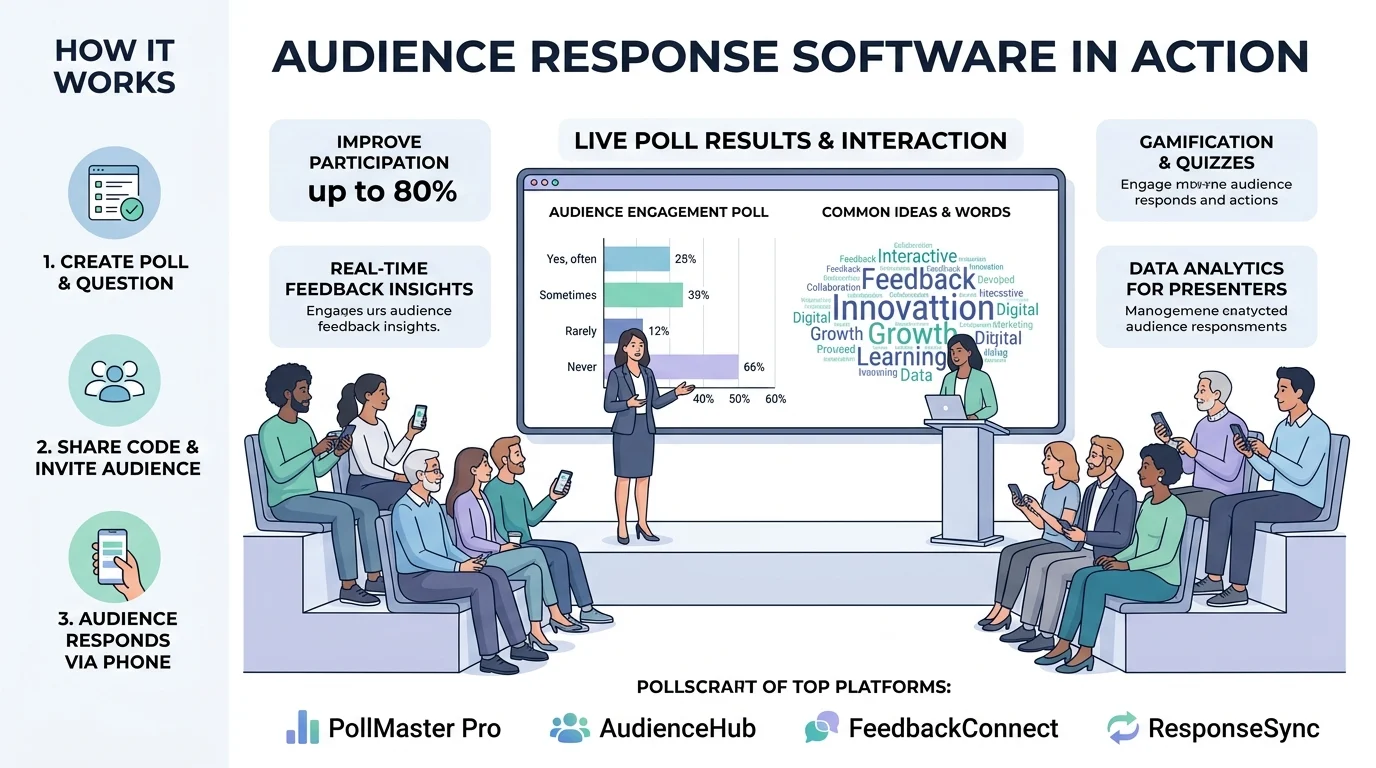
Quick Ans: Audience response software transforms passive listeners into active participants by letting them vote, ask questions, and share opinions in real time using their own devices. Key platforms include Slido (best for conferences), Poll Everywhere (best for classrooms), AhaSlides (best for presentations), and StreamAlive (best for live streams). Features typically include live polls, Q&A with upvoting, word clouds, quizzes, and analytics. Pricing ranges from free plans for small groups to enterprise solutions for thousands of participants.
You’re standing in front of a room. Fifty faces stare back at you. Are they engaged? Confused? Bored out of their minds? Without feedback, you’re flying blind.
Audience response software solves this problem. It turns every smartphone, tablet, and laptop into a feedback device, letting people vote on polls, submit questions, and share opinions anonymously or openly. The results appear instantly on your screen, showing you exactly what your audience thinks.
These tools have become essential for educators, conference speakers, corporate trainers, and live streamers. Research shows they increase attendance, attention levels, participation, and engagement while giving presenters real-time data to adjust their delivery . Whether you’re running a university lecture, a corporate town hall, or a global webinar, the right audience response software can transform a one-way presentation into a two-way conversation.
What Is Audience Response Software?
1. A Tool for Real-Time Interaction
Audience response software enables presenters to pose questions and receive instant responses from participants .
2. Works with Participants’ Own Devices
Modern software solutions use smartphones, tablets, or laptops, eliminating the need for dedicated hardware .
3. Collects Individualized Responses
The system captures answers from each participant, sometimes anonymously, and aggregates the data .
4. Displays Results Instantly
Results appear as bar charts, word clouds, or percentages on the presenter’s screen in real time .
5. Supports Multiple Question Types
Common formats include multiple choice, true/false, open-ended, word cloud, and ranking questions .
6. Includes Q&A Functionality
Many platforms let audience members submit questions and upvote others’ questions .
7. Records Data for Analysis
Responses are stored in databases for later review, reporting, and educational research .
8. Integrates with Presentation Tools
Popular integrations include PowerPoint, Google Slides, Zoom, Microsoft Teams, and event apps .
9. Scales from Small Classes to Large Conferences
Solutions range from free plans for 25 people to enterprise systems supporting 10,000+ attendees .
10. Eliminates the “Show of Hands” Problem
Unlike hand-raising, ARS provides accurate, anonymous, and recorded data .
11. Works for In-Person, Hybrid, and Virtual Events
Software-based systems connect audiences regardless of location .
12. Provides Immediate Feedback on Understanding
Educators can assess comprehension instantly and adjust teaching on the fly .
13. Encourages Participation from Quiet Audience Members
Anonymous options reduce social pressure, increasing response rates .
14. Tracks Individual Progress Over Time
Some systems link responses to individual users for longitudinal analysis .
15. Reduces Technical Barriers
Participants join via QR code, URL, or app without creating accounts on many platforms .
Top Audience Response Software Platforms in 2026
1. Slido
Best for conferences and large events. Trusted by major conferences worldwide, Slido handles Q&A, polls, and quizzes with 99.95% uptime . Supports up to 10,000 attendees for webinars . No app download required for participants.
2. Poll Everywhere
Best for classrooms and higher education. A proven platform since 2008, it integrates directly with Google Slides, PowerPoint, and Keynote . Free plan supports up to 40 responses per poll. Popular in universities for its reliability and simplicity .
3. AhaSlides
Best for educators and trainers wanting broad question variety. Integrates with PowerPoint, Google Slides, and Microsoft Teams. Supports up to 2,500 participants per session . Question types include polls, quizzes with leaderboards, word clouds, Q&A, open-ended responses, scales, and brainstorming prompts .
4. StreamAlive
Best for live streams and webinars. Works with Zoom, Teams, Google Meet, YouTube Live, and Twitch. Audience interactions are powered entirely by the chat stream, requiring no additional devices or logins. Uses AI to automatically extract questions from chat .
5. iClicker
Best for institutions with existing LMS infrastructure. Deep integration with Canvas, Blackboard, and Moodle for automatic grade syncing. Available as physical clickers or mobile app. Student subscriptions run around $15.99 per year .
6. Wooclap
Best for collaborative learning with pedagogical depth. Offers 21+ question types developed with neuroscientists. Includes brainstorming, image-labeling, gap-fill, and SWOT analysis frameworks. Free Starter plan for up to 5 active questions .
7. Socrative
Best for fast formative assessment. Designed for speed, with quiz creation and launch taking minutes. “Space Race” mode adds competitive energy. Free plan supports up to 50 students per room .
8. Q&A Events
Best for budget-conscious event organizers. Flat per-event pricing starting at EUR 5. No subscription required. Includes polls on Extended and Pro tiers .
Key Features to Look For
1. Live Polling
Multiple choice, true/false, and rating scale questions displayed with real-time results .
2. Q&A with Upvoting
Audience members submit questions and vote for their favorites, surfacing the most important ones .
3. Word Cloud Generation
Open-ended responses visualized as dynamic word clouds, with repeated words growing larger .
4. Quiz Mode with Leaderboards
Gamified assessments with scoring and competition to boost engagement .
5. Open-Ended Text Responses
Free-form answers for feedback, brainstorming, and discussion prompts .
6. Presentation Tool Integration
Native plugins for PowerPoint, Google Slides, Keynote, and virtual meeting platforms .
7. No-Download Participation
Audiences join via browser, QR code, or text message without installing apps .
8. Anonymous Response Options
Participants can respond without identifying themselves, increasing honesty .
9. Real-Time Result Display
Instant visualization of results on the presenter’s screen .
10. Data Export and Analytics
Download responses to Excel or Google Sheets for further analysis .
11. Moderation Tools
Review and approve questions before they appear to the audience .
12. Custom Branding
Match polls and Q&A interfaces to your event theme with logos and colors .
13. Multi-Room Support
Run simultaneous sessions with separate Q&A and polls for each room .
14. Attendance Tracking
Monitor who’s present and engaged during sessions .
15. AI-Powered Features
Automatic question extraction from chat streams and intelligent insights .
How Audience Response Software Works
1. Presenter Creates Activities
The presenter logs into the platform and creates polls, quizzes, or Q&A sessions .
2. Activities Inserted into Presentation
Polls and questions are added to slides in PowerPoint, Google Slides, or the platform’s interface .
3. Audience Joins via Code or Link
Participants access the session through a unique URL, QR code, or event code .
4. Participants Submit Responses
Audience members answer using their smartphones, tablets, or laptops .
5. System Aggregates Data
Responses are collected and tabulated in real time .
6. Results Display Instantly
Bar charts, word clouds, or lists appear on the presenter’s screen .
7. Presenter Adjusts Based on Feedback
Real-time data allows presenters to clarify confusion or dive deeper into topics .
8. Responses Stored for Later Analysis
All data is saved for reporting, research, or educational assessment .
9. Participants See Peer Responses
Audiences can compare their answers to the group, learning from collective wisdom .
10. Data Exported for Records
After the session, responses download to spreadsheets for grading or analysis .
Pricing Overview for 2026
1. Free Plans
Poll Everywhere: free for up to 40 responses per poll . AhaSlides: free plan with participant caps . Socrative: free for up to 50 students . Wooclap: free Starter plan with 5 active questions .
2. Entry-Level Pricing
Q&A Events: EUR 5 for Basic tier, EUR 10 for Extended, EUR 15 for Pro per event .
3. Subscription Pricing
Wooclap: Basic at $6.99/month billed annually; Pro at $14.99/month . iClicker: around $15.99 per year for students . Socrative Pro: $59.99/year for K-12, $99.99/year for Higher Ed and Corporate .
4. Academic Licensing
eduVote: €299 per year for single license .
5. Enterprise Solutions
Slido, Pigeonhole Live, and AhaSlides offer custom enterprise pricing for large-scale deployments .
6. Per-Event Pricing
Q&A Events and Pigeonhole Live offer per-event models without annual commitments .
7. Hardware Options (Legacy)
Traditional clicker systems: basic remotes $39.95-$69.95 each; complete sets $895-$4,895 .
8. Rental Options
Legacy system rentals: $1,800-$4,400 for total presentation packages .
Common Use Cases Across Industries
1. Higher Education Classrooms
Instructors use ARS for formative assessment, attendance, and increasing participation in large lectures .
2. Corporate Training Sessions
Trainers assess comprehension and gather feedback during professional development .
3. Conferences and Events
Speakers use Q&A with upvoting to manage audience questions efficiently .
4. Webinars and Virtual Meetings
StreamAlive and similar tools power interactions through chat streams on Zoom, Teams, and Google Meet .
5. Political Campaigns and News Events
Audience polling gauges public opinion and drives engagement .
6. Market Research
Companies collect consumer preferences and opinions in real time .
7. Continuing Medical Education
Healthcare professionals use ARS for knowledge assessment and feedback .
8. Hospital Patient Exit Surveys
Healthcare facilities gather patient feedback efficiently .
9. Game Shows and Entertainment
Audience polling creates interactive entertainment experiences .
10. Municipal and Environmental Planning
Public participation in decision-making processes is enhanced through ARS .
Frequently Asked Questions
What is audience response software?
It’s software that enables presenters to pose questions and receive instant responses from audiences using participants’ own devices .
What’s the difference between audience response software and clickers?
Clickers are physical handheld remotes. Software solutions use smartphones, tablets, or laptops, eliminating hardware costs .
Which audience response platform is best for conferences?
Slido is widely used at major conferences for its Q&A, polling, and reliability with 99.95% uptime .
Which platform is best for classrooms?
Poll Everywhere and iClicker are popular in higher education. Poll Everywhere has a free plan for up to 40 responses .
How many participants can these systems support?
Slido supports up to 10,000 attendees for webinars . AhaSlides supports up to 2,500 per session .
Do participants need to download an app?
Most modern platforms require no app. Participants join via browser, QR code, or text message .
Is there free audience response software?
Yes. Poll Everywhere, AhaSlides, Socrative, and Wooclap all offer free plans with participant limits .
Can audience response software integrate with PowerPoint?
Yes. Poll Everywhere, AhaSlides, and Slido integrate with PowerPoint and Google Slides .
How does Q&A with upvoting work?
Audience members submit questions through their devices. Others vote on questions, and the most upvoted rise to the top of the list .
What data can I export?
Most platforms allow export to Excel or Google Sheets, including response counts, percentages, and individual answers .
Is audience response software anonymous?
Many platforms offer anonymous response options, encouraging honest feedback from participants .
Can I use audience response software for virtual events?
Yes. StreamAlive works with Zoom, Teams, Google Meet, YouTube Live, and Twitch .
Conclusion
Audience response software has transformed how presenters connect with their audiences. From university lecture halls to global conferences to virtual webinars, these tools turn passive listeners into active participants. The research is clear: ARS improves attendance, attention, participation, engagement, and learning outcomes .
The best platform for you depends on your specific needs. Slido excels for conferences. Poll Everywhere dominates classrooms. AhaSlides offers the broadest question variety. StreamAlive powers live stream interactions through chat. Each has strengths, and many offer free plans to get started.
Don’t let another presentation be a one-way monologue. Try an audience response platform, run your first live poll, and watch your engagement metrics climb. Your audience has opinions. Give them a way to share them.
Discover More:
- Car Accident Demand Letter Response: Complete Guide for 2026
- Adidas Response Running Shoes: Complete Guide for 2026
