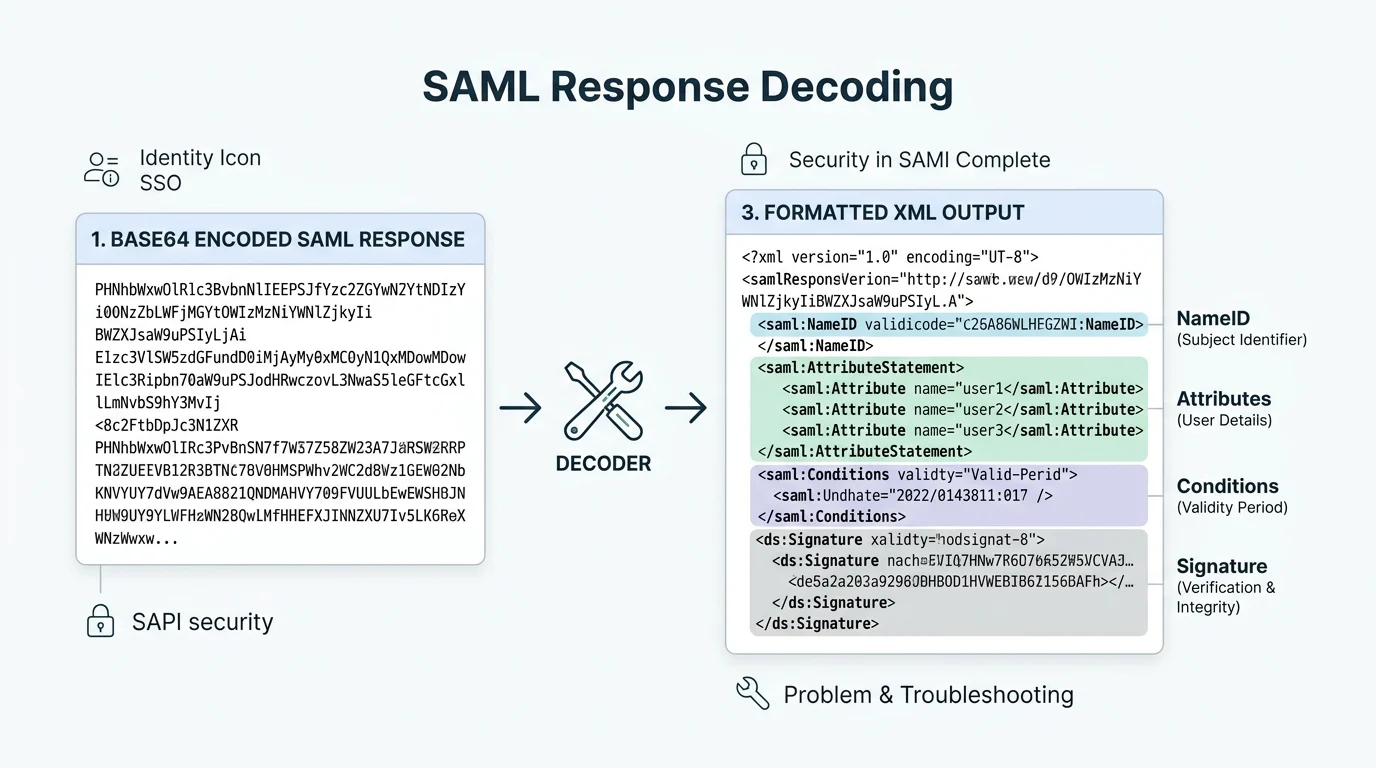
Quick Ans: A SAML response decoder is a tool that decodes and inspects SAML (Security Assertion Markup Language) responses exchanged during single sign-on (SSO) authentication. Key actions: paste your Base64-encoded SAMLResponse into the decoder, view the decoded XML, inspect assertions, attributes, conditions, and signature. Popular tools include SAMLTool.io, OneLogin’s SAML decoder, and developer console utilities. Decoding helps troubleshoot login failures, verify attribute mapping, and validate signature certificates. Always decode in a secure environment since responses contain sensitive identity data.
You’re setting up single sign-on between your app and an identity provider. Users click “Login with SSO” and get an error. No useful message. Just “authentication failed.” Now what? This is where a SAML response decoder becomes your best debugging friend.
SAML, or Security Assertion Markup Language, is the protocol that powers most enterprise single sign-on. When a user authenticates, the identity provider sends a SAML response back to your service provider. That response is Base64-encoded XML packed with assertions about who the user is, what attributes they have, and when the assertion expires. When something breaks, the only way to see what’s actually happening is to decode that response.
A SAML response decoder takes that encoded blob and turns it into readable XML you can inspect. You’ll see the NameID, attribute statements, conditions, audience restrictions, and signature details. This guide covers what SAML responses contain, how decoders work, the best tools available, and how to troubleshoot common issues. Whether you’re a developer, IT admin, or identity engineer, understanding SAML decoding will save you hours of guesswork.
What Is a SAML Response?
1. A Base64-Encoded XML Document
The SAML response is XML that has been Base64-encoded for safe transmission over HTTP .
2. Contains Authentication Assertions
The response includes one or more assertions stating that a user has been authenticated .
3. Includes User Identity Information
The NameID element identifies the authenticated user, often as an email or username.
4. Carries Attribute Statements
Attributes like email, role, department, and group membership are included in the response.
5. Has Conditions and Validity Windows
The assertion specifies NotBefore and NotOnOrAfter timestamps defining its validity .
6. Includes Audience Restrictions
The Audience element restricts which service providers can accept the assertion.
7. May Be Digitally Signed
Most production responses include an XML signature to prevent tampering.
8. Contains Subject Confirmation Data
This specifies how and when the subject was authenticated, including recipient and InResponseTo values.
9. Sent via HTTP POST Binding
Most SAML responses are delivered via browser POST to the service provider’s ACS URL.
10. Part of the SSO Flow
The response is sent after the user authenticates at the identity provider.
11. Can Be Encrypted
Some configurations encrypt the assertion or entire response for additional security.
12. Has a Unique Response ID
Each response carries a unique ID for tracking and correlation.
13. References the Original Request
The InResponseTo attribute links the response to the authentication request.
14. Contains Issuer Information
The Issuer element identifies which identity provider generated the response.
15. Time-Sensitive
SAML responses have short validity windows, often just minutes.
What Is a SAML Response Decoder?
1. A Tool That Decodes Base64 SAML
It takes the encoded SAMLResponse parameter and converts it to readable XML .
2. Displays Formatted XML
The decoder pretty-prints the XML for easier inspection.
3. Extracts Key Elements
Decoders highlight assertions, attributes, conditions, and signatures.
4. Validates Signatures
Some decoders verify the XML signature against the provided certificate.
5. Checks Certificate Expiration
Advanced tools show whether the signing certificate is still valid.
6. Verifies Conditions
Decoders display NotBefore and NotOnOrAfter timestamps for validity checking.
7. Shows Attribute Mapping
You can see exactly which attributes the IdP sent and their values.
8. Available as Online Tools
SAMLTool.io and OneLogin offer free browser-based decoders.
9. Available as Browser Extensions
Extensions like SAML Chrome Panel let you decode directly in the browser.
10. Available as Developer Utilities
Command-line tools and libraries exist for programmatic decoding.
11. Helps Troubleshoot SSO Failures
Decoding reveals mismatched attributes, expired assertions, or signature issues.
12. Assists with Attribute Mapping
You can verify that the IdP is sending the attributes your SP expects.
13. Useful for Testing
During setup, decoders confirm that responses contain the right data.
14. Aids Security Auditing
Inspecting responses helps detect misconfigurations or tampering attempts.
15. Requires Secure Handling
Decoded responses contain sensitive identity data and should be handled carefully.
Key Components of a SAML Response
1. Response Element
The root element containing the entire SAML response.
2. Issuer
Identifies the identity provider that generated the response.
3. Signature
XML digital signature proving the response’s authenticity and integrity.
4. Subject
Identifies the authenticated principal, usually via NameID.
5. NameID
The unique identifier for the user, often an email address or persistent ID.
6. SubjectConfirmation
Specifies how the subject was authenticated.
7. SubjectConfirmationData
Contains Recipient, NotOnOrAfter, and InResponseTo attributes.
8. Conditions
Specifies NotBefore and NotOnOrAfter validity windows.
9. AudienceRestriction
Limits which service providers can accept the assertion.
10. AuthnStatement
Describes the authentication event, including AuthnInstant and SessionIndex.
11. AuthnContext
Specifies the authentication method or context used.
12. AttributeStatement
Contains user attributes like email, name, role, and groups.
13. Attribute
Individual attribute with Name and NameFormat.
14. AttributeValue
The actual value of an attribute.
15. Status
Indicates whether the request succeeded or failed, with status codes.
Best SAML Response Decoder Tools in 2026
1. SAMLTool.io
A popular free online decoder that formats XML and highlights key elements.
2. OneLogin SAML Decoder
OneLogin’s free tool decodes and inspects SAML responses and assertions.
3. SAML Chrome Panel
A Chrome extension that captures and decodes SAML responses in real time.
4. SAML Tracer (Firefox)
A Firefox extension that traces and decodes SAML messages.
5. Auth0 SAML Decoder
Auth0 offers a free decoder for inspecting SAML responses.
6. Okta SAML Troubleshooting Tools
Okta provides built-in tools for decoding and troubleshooting SAML.
7. Microsoft Entra ID SAML Tools
Microsoft offers tools for debugging SAML-based SSO with Entra ID.
8. Developer Console Utilities
Browser developer tools can decode Base64 and display XML.
9. Command-Line Decoders
Tools like saml-decoder and xmlsec1 decode and verify SAML offline.
10. Python Libraries
python3-saml and PySAML2 can programmatically decode and validate responses.
11. Java Libraries
OpenSAML and OneLogin’s Java toolkit handle SAML decoding and validation.
12. Node.js Libraries
passport-saml and samlify decode and validate SAML responses in Node.js.
13. .NET Libraries
Sustainsys.Saml2 and ITfoxtec handle SAML in .NET applications.
14. Ruby Libraries
ruby-saml decodes and validates SAML responses in Ruby.
15. Go Libraries
crewjam/saml and saml libraries exist for Go applications.
How to Decode a SAML Response Step by Step
1. Capture the SAMLResponse
Use browser developer tools or a SAML tracer to capture the SAMLResponse parameter.
2. Locate the SAMLResponse Parameter
Look in the POST body or URL query string for the SAMLResponse field.
3. Copy the Base64 Value
Copy the entire Base64-encoded string without truncation.
4. Paste Into a Decoder
Open SAMLTool.io or your preferred decoder and paste the value.
5. Decode the Base64
The decoder converts Base64 to XML automatically.
6. View the Formatted XML
The decoder pretty-prints the XML for readability.
7. Inspect the NameID
Check that the user identifier matches expectations.
8. Review Attribute Statements
Verify that all required attributes are present with correct values.
9. Check Conditions
Confirm NotBefore and NotOnOrAfter timestamps are valid.
10. Verify the Audience
Ensure the Audience matches your service provider’s entity ID.
11. Validate the Signature
Verify the signature against the IdP’s certificate.
12. Check Certificate Expiration
Confirm the signing certificate has not expired.
13. Look for Status Codes
Check the Status element for success or failure indicators.
14. Compare with Expectations
Compare decoded values with your SP configuration.
15. Document Findings
Save the decoded XML for troubleshooting records.
Common SAML Response Issues and Fixes
1. Invalid Signature
The signature doesn’t match the certificate. Verify you’re using the correct IdP certificate.
2. Expired Certificate
The signing certificate has expired. Update the certificate in your SP configuration.
3. Clock Skew
The SP and IdP clocks are out of sync. Ensure both use NTP time synchronization.
4. Audience Mismatch
The Audience value doesn’t match your SP entity ID. Update your SP configuration.
5. Missing Attributes
Required attributes aren’t being sent. Configure attribute release in the IdP.
6. Wrong NameID Format
The NameID format doesn’t match what your SP expects. Adjust IdP or SP settings.
7. Expired Assertion
The NotOnOrAfter timestamp has passed. Check clock synchronization.
8. InResponseTo Mismatch
The InResponseTo value doesn’t match the original request. Check session state.
9. Recipient Mismatch
The Recipient doesn’t match your ACS URL. Verify ACS URL configuration.
10. Encrypted Assertion Issues
If the assertion is encrypted, ensure your SP has the correct decryption key.
11. Status Failure
The Status element indicates failure. Check the StatusCode and StatusMessage.
12. Missing Signature
The response isn’t signed. Configure the IdP to sign responses.
13. Algorithm Mismatch
The signing algorithm doesn’t match. Align SHA-256 settings between IdP and SP.
14. Duplicate Attributes
The same attribute appears multiple times. Check IdP attribute release policies.
15. Malformed XML
The XML is invalid. Check for encoding issues or truncation.
Security Best Practices for SAML Decoding
1. Never Decode in Production
Avoid decoding real SAML responses in shared or public environments.
2. Use Secure Workstations
Decode only on trusted, secured machines.
3. Clear Clipboard After Use
SAML responses contain sensitive data. Clear your clipboard.
4. Avoid Public Online Decoders for Sensitive Data
Use offline or self-hosted tools for production troubleshooting.
5. Redact Sensitive Information
Remove or mask personal data before sharing decoded XML.
6. Verify Signatures Always
Never trust a SAML response without verifying its signature.
7. Check Certificate Validity
Confirm the signing certificate is current and trusted.
8. Validate Conditions
Always check NotBefore and NotOnOrAfter timestamps.
9. Validate Audience
Ensure the response is intended for your service provider.
10. Use HTTPS Everywhere
SAML exchanges should always occur over HTTPS.
11. Rotate Certificates Regularly
Replace signing certificates before expiration.
12. Monitor for Replay Attacks
Check InResponseTo and prevent replay of old responses.
13. Log Security Events
Log SAML validation failures for security monitoring.
14. Follow Least Privilege
Only release attributes the SP actually needs.
15. Stay Updated
Keep SAML libraries and tools patched against known vulnerabilities.
Frequently Asked Questions
What is a SAML response decoder?
It’s a tool that decodes Base64-encoded SAML responses into readable XML for inspection and troubleshooting.
Why do I need to decode a SAML response?
To troubleshoot SSO failures, verify attribute mapping, check signatures, and validate conditions.
Are online SAML decoders safe?
For test data, yes. For production data with real user information, use offline or self-hosted tools.
What is SAMLTool.io?
A popular free online SAML decoder that formats XML and highlights key elements.
How do I capture a SAML response?
Use browser developer tools, SAML tracer extensions, or proxy tools to capture the SAMLResponse parameter.
What is the difference between SAML request and response?
The request asks the IdP to authenticate a user. The response contains the authentication assertion.
What is Base64 encoding in SAML?
SAML XML is Base64-encoded for safe transmission over HTTP.
How do I verify a SAML signature?
Use the IdP’s public certificate to verify the XML signature in the decoded response.
What causes SAML signature validation failures?
Wrong certificate, expired certificate, clock skew, or algorithm mismatch.
What is the Audience in a SAML response?
It restricts which service providers can accept the assertion. It must match your SP entity ID.
What is InResponseTo in SAML?
It links the response to the original authentication request to prevent replay attacks.
What is NameID in SAML?
It’s the unique identifier for the authenticated user, often an email or persistent ID.
What is a SAML assertion?
A statement about a user, typically confirming authentication and providing attributes.
Can I decode SAML responses offline?
Yes. Command-line tools and libraries like python3-saml decode responses offline.
What should I do if decoding reveals a missing attribute?
Configure attribute release in your IdP to include the missing attribute.
Conclusion
SAML response decoders are essential tools for anyone working with enterprise single sign-on. When SSO breaks, decoding the response is often the fastest way to find the root cause. From mismatched audiences to expired certificates, clock skew to missing attributes, the decoded XML tells the full story.
The tools available in 2026 make decoding easier than ever. SAMLTool.io, OneLogin’s decoder, and browser extensions handle most troubleshooting needs. For production environments, offline and self-hosted options keep sensitive identity data secure. Libraries for Python, Java, Node.js, and other languages enable programmatic decoding for automation.
Remember the security fundamentals: always verify signatures, check certificate validity, validate conditions, and never trust an unverified response. Decode in secure environments, redact sensitive data before sharing, and keep your SAML libraries patched. With these practices, you’ll troubleshoot SSO issues confidently and keep your authentication flows secure.
Discover More:
- Acoustic Website Response Time Monitoring Tools: 10 Powerful Options for 2026
- Utility Demand Response Programs: Complete Guide for 2026
