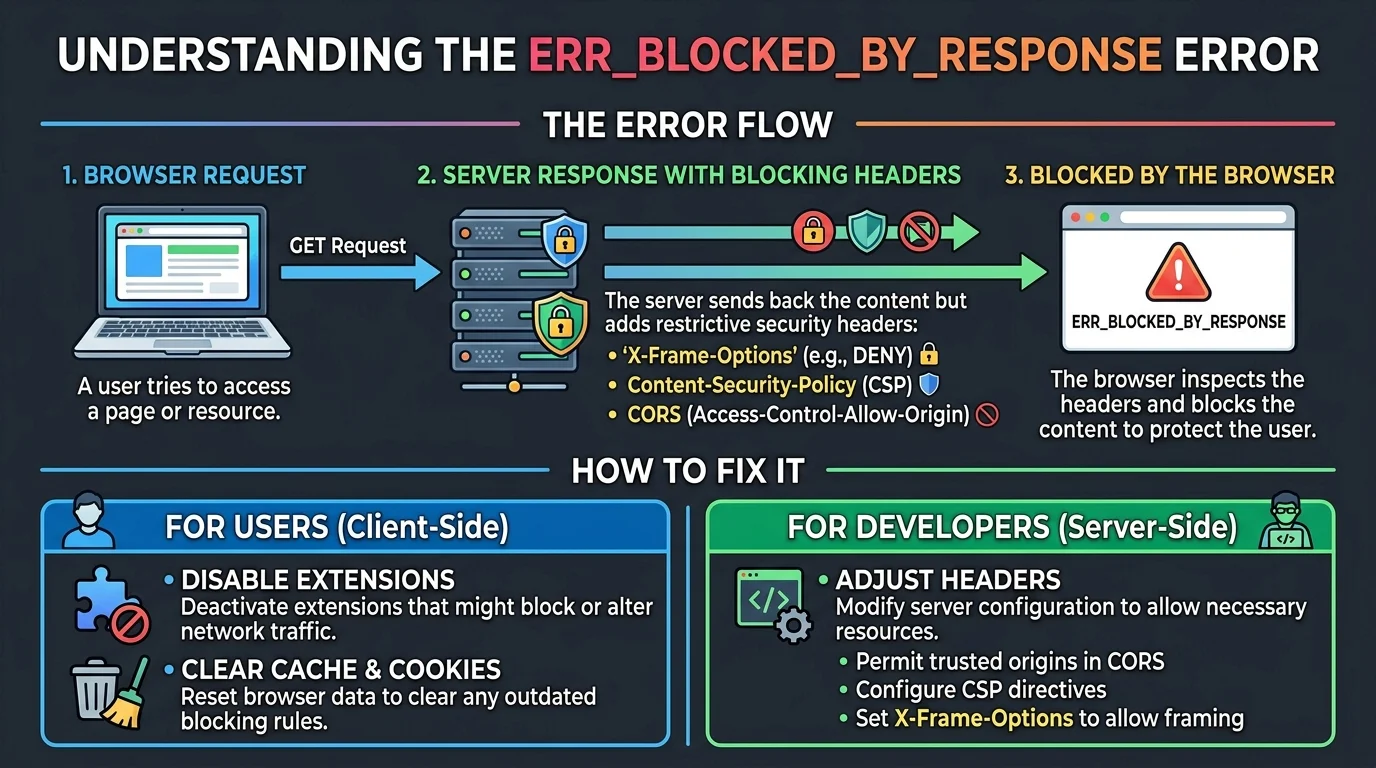
Quick Ans: ERR_BLOCKED_BY_RESPONSE is a browser error that occurs when a server explicitly blocks a request due to security headers or policies. The most common causes are X-Frame-Options (blocking iframe embedding), Content-Security-Policy (CSP) violations, and Cross-Origin Resource Sharing (CORS) misconfigurations. Quick fixes include disabling ad blockers, testing in incognito mode, clearing browser cache, or contacting the website owner to adjust server headers.
You click a link, expecting a page to load. Instead, you get a cryptic error: ERR_BLOCKED_BY_RESPONSE. The page is blank, the connection refused, and you’re left wondering what went wrong.
This error is not a network problem on your end. It is a deliberate message from the server, telling your browser: “I am sending you this response, but I am blocking you from using it.” The server has rules in place, usually for security, and your request has violated one of them.
Understanding why this happens is the first step to fixing it. The error can affect anything from Outlook and YouTube to embedded content, Android apps, and even MATLAB. Whether you are a casual user trying to access your email or a developer troubleshooting your own website, knowing the common causes and solutions saves hours of frustration. Let’s break down exactly what triggers this error and how to resolve it.
What Is ERR_BLOCKED_BY_RESPONSE?
1. A Server-Side Response Block
The error occurs when a web request is blocked due to server or browser settings, preventing resources like scripts, images, or entire pages from loading .
2. Not a Client-Side Problem
Unlike some browser errors, this one is triggered by the server’s response headers, not by your internet connection or device .
3. Appears in DevTools Console
Developers often see this error in the browser’s developer console when specific resources fail to load .
4. Can Affect Entire Pages or Single Resources
The error may block an entire webpage from loading, or just a specific script, image, or iframe .
5. Common with Embedded Content
Iframes, widgets, and embedded tools frequently trigger this error due to X-Frame-Options headers .
6. Related to Security Headers
The blocking is typically caused by HTTP response headers like X-Frame-Options, Content-Security-Policy, or CORS headers .
7. Different from ERR_BLOCKED_BY_CLIENT
This error comes from the server, not from browser extensions or client-side blockers .
8. Not an HTTP Error Code
ERR_BLOCKED_BY_RESPONSE is a browser-level error message, not an HTTP status code like 403 or 404.
9. Can Occur in Any Browser
Chrome, Edge, Firefox, and Safari all display variations of this error.
10. Sometimes Accompanied by 304 Status
Some cases show a 304 status alongside the error, indicating a cached resource was blocked .
11. Affects Mobile Apps Too
Android apps, including Moodle and Facebook Messenger plugins, can encounter this error .
12. Not Always a Bug
The block is often intentional, designed to protect users from clickjacking, cross-site scripting, or data leaks.
13. Can Be Temporary
Sometimes the error resolves on its own if it was caused by a temporary server misconfiguration.
14. Requires Diagnosis
The exact cause varies by situation. Checking server headers and browser settings is essential .
Common Causes of ERR_BLOCKED_BY_RESPONSE
1. X-Frame-Options Header
This header tells the browser whether a page can be displayed in a frame or iframe. Values like DENY or SAMEORIGIN block embedding .
2. Content-Security-Policy (CSP) Violations
CSP headers restrict where scripts, styles, and other resources can load from. If a response violates the defined policy, the browser blocks it .
3. Cross-Origin Resource Sharing (CORS) Issues
CORS headers control how resources on one domain are accessed by another. Misconfigured CORS headers lead to blocked requests .
4. Browser Extensions and Ad Blockers
Ad blockers, privacy extensions, and script-blocking add-ons can interfere with requests and trigger the error .
5. Network Restrictions
Firewalls, VPNs, proxies, and DNS filtering services can block requests to external domains .
6. Incorrect API or JavaScript Code
Malformed API requests or JavaScript errors can cause the server to respond in a way that the browser blocks .
7. Missing Cross-Origin-Resource-Policy Header
When using COEP: require-corp, cross-origin subresources must include this header to be embedded .
8. Server-Side Security Modules
Proxy, firewall, or web server security modules may set headers that conflict with application requirements .
9. Misconfigured .htaccess or Nginx Config
Incorrect server configuration files can introduce headers that block legitimate requests .
10. Antivirus Web Protection
Security software like McAfee or Windows Defender can block specific domains or resources .
11. Expired or Stale Credentials
Old authentication tokens or cached credentials can cause the server to reject requests .
12. Browser Cache Corruption
Stored site data can conflict with current server policies, leading to blocked responses .
13. Cross-Origin Isolation Requirements
Using SharedArrayBuffer requires specific COOP and COEP headers that can conflict with web workers .
14. Third-Party Plugin Conflicts
Plugins like Facebook Messenger or H5P can trigger the error if their embedding permissions are not configured .
How to Fix ERR_BLOCKED_BY_RESPONSE as a User
1. Disable Ad Blockers and Extensions
Temporarily turn off ad blockers, privacy extensions, and script blockers, then reload the page .
2. Test in Incognito or InPrivate Mode
Private browsing disables extensions by default. If the page loads, an extension is the culprit .
3. Clear Browser Cache and Cookies
Cached data can cause conflicts. Clear browsing data and reload the page .
4. Try a Different Browser
Test the page in Chrome, Firefox, or Edge to isolate browser-specific issues .
5. Switch Networks
Try a mobile hotspot or different Wi-Fi. If it works, your network has restrictions .
6. Disable VPN or Proxy
VPNs and proxies can interfere with requests. Temporarily disable them and test again .
7. Check Antivirus Settings
Security software may block specific domains. Temporarily disable web protection and test .
8. Check Microsoft Service Status
For Outlook issues, verify if Microsoft has an active service incident .
9. Reset Credentials Manager
On Windows, clear stored credentials for the affected domain in Credential Manager .
10. Use the Mobile App Instead
If the web version fails, try the mobile app for immediate access .
11. Contact the Website Owner
If the site consistently fails, the server headers need adjustment .
12. Report to Hosting Provider
If you own the site, contact your hosting provider to check iframe permissions .
13. Check Browser Console for Details
Developers can see the exact blocked resource and header causing the issue .
14. Restart Your Device
A simple restart can resolve temporary network or software glitches.
15. Update Your Browser
Older browser versions may have bugs or outdated security policies.
How to Fix ERR_BLOCKED_BY_RESPONSE as a Website Owner
1. Review X-Frame-Options Header
Check if your server sends X-Frame-Options: DENY or SAMEORIGIN. Adjust or remove it if iframe embedding is needed .
2. Configure Content-Security-Policy
Review your CSP header, especially frame-ancestors directives. Allow required domains .
3. Fix CORS Configuration
Ensure your server sends correct Access-Control-Allow-Origin headers for cross-origin requests .
4. Add Cross-Origin-Resource-Policy Header
For COEP: require-corp contexts, add Cross-Origin-Resource-Policy: cross-origin to subresources .
5. Check .htaccess or Nginx Config
Look for conflicting header settings in your server configuration files .
6. Disable Conflicting Security Modules
Some security modules set headers that conflict with application needs. Test with them disabled .
7. Set Correct Frame-Ancestors Policy
Use Content-Security-Policy: frame-ancestors to specify which domains can embed your content .
8. Verify API Endpoints
Ensure API requests are properly formed and endpoints return valid responses .
9. Test with Browser DevTools
Open the Network tab to see which resources are blocked and why .
10. Use Nginx Configuration for Frame Embedding
Add add_header Content-Security-Policy "frame-ancestors *" always; to allow framing .
11. Configure Apache Headers
Add Header always set X-Frame-Options "SAMEORIGIN" to allow same-origin embedding .
12. Check Hosting Provider Settings
Some providers control iframe permissions at the platform level .
13. Test Across Devices
Verify the fix works on Android, iOS, desktop, and different browsers .
14. Monitor Server Logs
Check error logs for patterns related to blocked requests.
15. Implement Gradual Rollout
Test header changes in staging before deploying to production.
Specific Scenarios and Solutions
1. Outlook.com Not Loading
Disable ad blockers, test in InPrivate mode, and check Microsoft service status .
2. Iframe Content Blocked
The embedded site likely sends X-Frame-Options: DENY. Contact the site owner or use a different embedding method .
3. Android App Errors
Check if the app uses iframes. Server headers may need adjustment for mobile compatibility .
4. YouTube Blocked
Network administrators or ISPs may block YouTube. Check with your network provider .
5. Moodle H5P Failures
Add X-Frame-Options SAMEORIGIN to .htaccess or configure nginx with frame-ancestors * .
6. Facebook Messenger Plugin
Android devices may block the plugin. Check app permissions and server headers .
7. MATLAB Network Error
The error may freeze the interface. Check proxy settings and network connectivity .
8. Web Worker with SharedArrayBuffer
Requires specific COOP and COEP headers. Cross-origin workers need explicit opt-in .
9. Google Docs Blocked
Network administrators can block Google services. Contact your IT department .
10. Blazor Server in Iframe
Configure CORS and X-Frame-Options to allow embedding domains .
Frequently Asked Questions
What does ERR_BLOCKED_BY_RESPONSE mean?
It means the server sent a response but blocked your browser from using it due to security headers or policies .
Is ERR_BLOCKED_BY_RESPONSE a virus?
No, it is a security feature, not malware. It indicates the server is protecting itself .
Why does this error happen only on some websites?
Different servers use different security headers. Some are stricter than others .
Can I fix ERR_BLOCKED_BY_RESPONSE myself?
As a user, yes, by disabling extensions, clearing cache, or switching networks. As a website owner, you need to adjust server headers .
Does this error mean the website is down?
Not necessarily. The server is responding but blocking your request .
Why does Outlook show this error?
Ad blockers, privacy extensions, or network restrictions often cause it. Test in InPrivate mode .
How do I fix iframe embedding errors?
The embedded site needs to remove or adjust X-Frame-Options and CSP headers .
Is this error related to CORS?
Yes, CORS misconfigurations are a common cause of ERR_BLOCKED_BY_RESPONSE .
Can VPN cause this error?
Yes, VPNs and proxies can trigger the error by altering requests or blocking domains .
What is X-Frame-Options?
An HTTP header that tells browsers whether a page can be displayed in a frame or iframe .
What is Content-Security-Policy?
A security header that restricts where scripts, styles, and other resources can load from .
How do I check which header is blocking me?
Open browser DevTools, go to the Network tab, and inspect the blocked resource’s response headers .
Can this error affect mobile apps?
Yes, Android apps and mobile browsers can encounter this error .
How do I allow my site to be embedded in iframes?
Remove X-Frame-Options or set it to allow specific domains. Adjust CSP frame-ancestors accordingly .
Will clearing cache fix the error?
Sometimes, if the issue is caused by stale or corrupted cached data .
Conclusion
ERR_BLOCKED_BY_RESPONSE is a security-focused browser error that blocks requests based on server response headers. While it can be frustrating, understanding the causes empowers you to fix it. As a user, simple steps like disabling extensions, testing in incognito mode, or switching networks often resolve the issue. As a website owner, reviewing X-Frame-Options, CSP, and CORS headers is essential for allowing legitimate embedding and cross-origin requests.
The error is not a sign of a broken website or a virus. It is the server doing its job, albeit sometimes too aggressively. With the right diagnosis, most cases are fixable in minutes. Share this guide with anyone struggling with blocked responses, and bookmark it for your next troubleshooting session. The web is built on trust, and understanding these security mechanisms helps keep it safe.
Discover More:
- Live Chat Canned Responses Examples: 200+ Templates for 2026
- Dermalogica Smart Response Serum: Complete Guide for 2026

1 thought on “ERR_BLOCKED_BY_RESPONSE: Complete Guide for 2026”