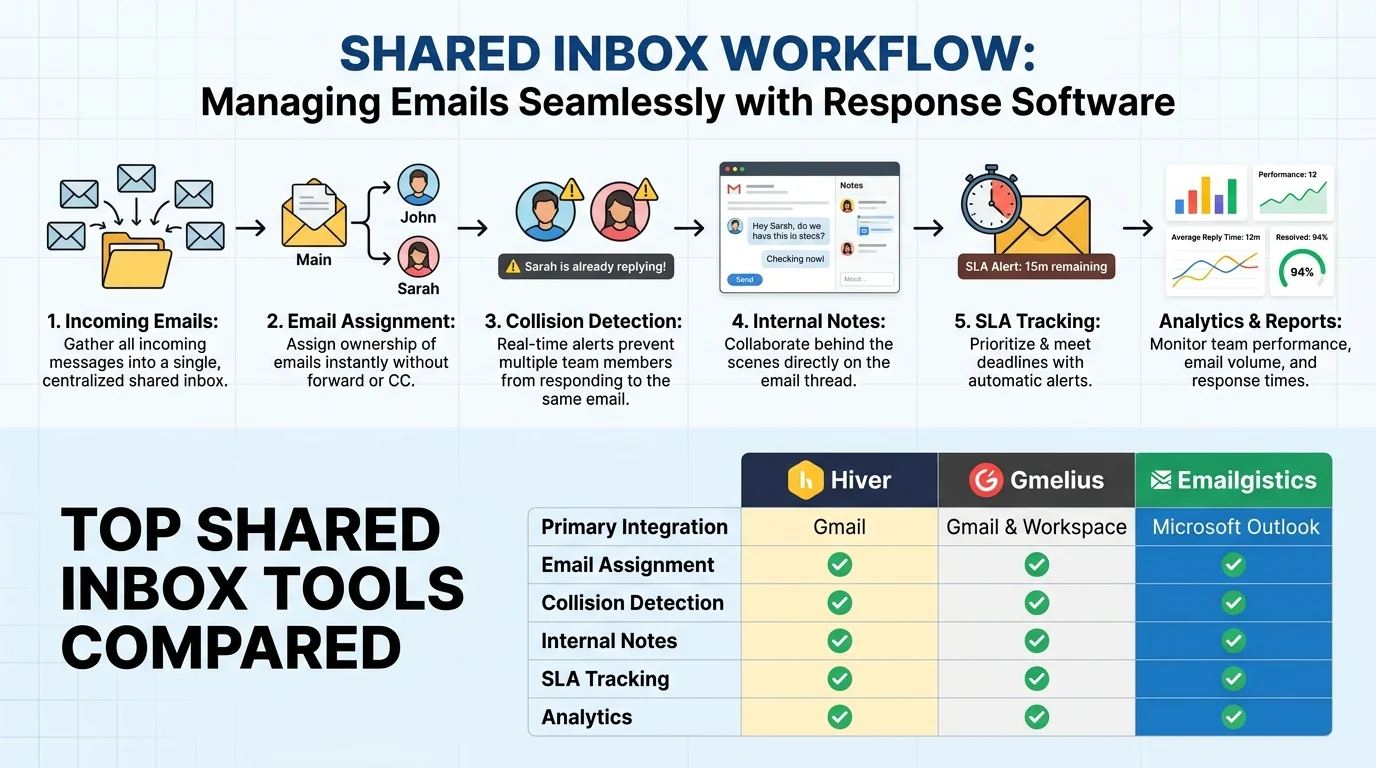
Quick Ans: Email response management software (ERMS) is a specialized tool that helps teams handle high-volume inboxes by automating routing, assignment, and response workflows. Top solutions include Hiver, Gmelius, Emailgistics, and Nutshell. Key benefits: 50-65% faster email resolution, eliminated duplicate replies, clear ownership tracking, and SLA monitoring. Most tools integrate directly with Gmail or Outlook, requiring no new interface to learn. Pricing ranges from free tiers to $45+ per user per month for enterprise features.
Your support@ inbox has 347 unread emails. Three team members are replying to the same customer. A critical inquiry from your biggest client is buried under newsletters. Sound familiar? This is the daily reality for teams managing shared email accounts without proper tools.
Email response management software solves this chaos. Also called ERMS (Email Response Management Systems), these tools transform cluttered shared inboxes into organized, trackable workflows with clear ownership and automated routing . Instead of forwarding emails and hoping someone handles them, you get assignment rules, collision detection, and real-time status tracking.
The problem is real: the average company now uses 275 SaaS applications, and 75% of employees report productivity damage from tool overload . The best email management tools work inside your existing Gmail or Outlook, adding structure without forcing you to learn new software. Teams using these tools report 50-65% faster email resolution and complete elimination of missed messages . Let’s explore how these systems work and which one fits your team.
What Is Email Response Management Software?
1. A System for High-Volume Inbox Management
ERMS tools help teams handle large volumes of incoming email inquiries efficiently .
2. Built for Shared Inboxes
Designed for accounts like support@, info@, or sales@ where multiple people respond .
3. Adds Structure to Gmail or Outlook
Most tools integrate directly with existing email clients without requiring a new interface .
4. Automates Routing and Assignment
Emails are automatically directed to the right person based on rules, skills, or availability .
5. Prevents Duplicate Responses
Collision detection alerts team members when someone else is already replying .
6. Tracks Ownership and Status
Every email becomes a trackable item with clear ownership and workflow stages .
7. Includes SLA Monitoring
Managers can set response time targets and get alerts when they’re breached .
8. Provides Analytics and Reporting
Dashboards show response times, workload distribution, and team performance .
9. Uses AI for Response Drafting
Modern ERMS tools include AI that drafts replies and suggests next steps .
10. Scales with Team Size
Works for teams of 5 or 500 without performance degradation .
11. Reduces Manual Sorting
Automation eliminates the need for manual triage and categorization .
12. Ensures No Email Slips Through
Every message has an owner and a status until resolved .
13. Integrates with Other Tools
Connects with Slack, Jira, CRMs, and 1,000+ other systems .
14. Supports Omnichannel
Some platforms handle email alongside chat, Slack, Teams, and voice .
15. Provides Compliance and Security
Enterprise-grade security with SOC 2 compliance and access controls .
Top Email Response Management Software Solutions
1. Hiver
Hiver is an AI-powered email management tool trusted by 10,000+ teams for Gmail and Outlook shared inboxes . It converts emails into trackable tickets with assignment, collision alerts, and SLA monitoring. Hiver’s AI Agents resolve complex requests end-to-end, while AI Copilot drafts replies and suggests next steps . Teams report 50-65% faster email resolution . Pricing starts with a free tier, with paid plans scaling by features.
2. Gmelius
Gmelius sits on top of Gmail and transforms shared inboxes into collaborative workspaces . It offers kanban board views, email assignment with @mentions, and automation rules that handle repetitive tasks. The platform integrates with Trello and Slack, letting team members work from their preferred tools . Gmelius applies SLA rules automatically and initiates cascading reply sequences. The Growth plan is $25 per user per month .
3. Emailgistics
Emailgistics is purpose-built for Microsoft 365 shared mailboxes, keeping teams working directly in Outlook . It provides auto-assignment, SLA tracking, AI-assisted replies, and mailbox-level analytics without requiring CRM adoption. Setup takes as fast as 30 minutes . The workflow automation features include conditional triggers, round-robin assignment, and balanced workload distribution . Emailgistics is SOC 2 compliant and ideal for operations, HR, and finance teams.
4. Nutshell Shared Inbox
Nutshell’s shared inbox lives inside its CRM, automatically creating leads from inbound emails . AI reads emails, pulls contact details, and routes messages to the right pipeline. Teams can reply as themselves or as the shared address. Round-robin assignment distributes load evenly. Internal notes keep collaboration invisible to customers. The AI filters newsletters and spam while flagging genuine leads .
Key Features to Look For
1. Shared Inbox Functionality
Multiple team members must access and respond from one email address without sharing passwords .
2. Email Assignment
Emails can be assigned to specific team members with clear ownership and accountability .
3. Collision Detection
Real-time alerts prevent two people from replying to the same email .
4. Internal Notes
Team members can discuss emails privately without the customer seeing the conversation .
5. SLA Tracking
Response time targets can be set with breach alerts for managers .
6. Automation Rules
Emails can be routed, tagged, and categorized automatically based on content or sender .
7. Templates and Snippets
Pre-written responses speed up replies and ensure consistency .
8. Analytics Dashboard
Managers can track response times, workload, and team performance .
9. AI Response Drafting
Modern tools use AI to draft context-aware replies and suggest next steps .
10. Integration Capabilities
Connection with Slack, Jira, CRMs, and other workflow tools .
11. Mobile Access
Team members should be able to respond from mobile devices when needed.
12. Role-Based Permissions
Admin and member roles with granular access controls .
13. Reporting and Export
Data should be exportable for deeper analysis and compliance requirements.
14. Scalability
The tool should handle growing team sizes without performance issues .
15. Security and Compliance
SOC 2 compliance, data encryption, and access controls are essential .
Benefits of Email Response Management Software
1. Faster Response Times
Teams report 50-65% faster email resolution after implementing ERMS tools .
2. Eliminated Missed Emails
Every message gets an owner and status, ensuring nothing falls through the cracks .
3. Reduced Duplicate Work
Collision detection prevents multiple team members from replying to the same email .
4. Clear Accountability
Assignment features make it obvious who is responsible for each response .
5. Improved Team Collaboration
Internal notes and shared context keep everyone aligned .
6. Better Customer Experience
Faster, more consistent responses improve satisfaction and loyalty .
7. Manager Visibility
Dashboards show workload, response times, and SLA compliance in real time .
8. Reduced Training Time
Templates and AI assistance help new team members respond accurately from day one .
9. Scalability Without Chaos
Tools handle growing volumes without proportional increases in confusion .
10. Data-Driven Decisions
Analytics reveal bottlenecks and coaching opportunities .
11. Consistency Across Shifts
Handoff features ensure the next shift knows what’s pending .
12. Time Savings
Automation eliminates manual sorting and routing tasks .
13. Better Workload Distribution
Round-robin and skill-based routing balance work fairly .
14. Reduced Stress
Clear workflows reduce the anxiety of an unmanaged inbox .
15. Measurable ROI
Time saved translates directly to cost savings and revenue impact.
What to Consider Before Choosing
1. Your Email Platform
Some tools only work with Gmail, others with Outlook, and some support both .
2. Team Size
Pricing and features scale differently. Small teams may prefer simpler tools .
3. Volume of Emails
High-volume teams need robust automation and routing .
4. Budget Constraints
Free tiers exist, but advanced features require paid plans .
5. Required Integrations
Check if the tool connects with your CRM, helpdesk, or project management software .
6. AI Requirements
Some teams need AI drafting; others just need basic assignment features .
7. Compliance Needs
Regulated industries may require SOC 2 or HIPAA compliance .
8. Customization Flexibility
Consider whether you need custom rules, fields, or workflows.
9. Setup Complexity
Some tools require lengthy implementation; others connect in minutes .
10. Training Requirements
Tools that work inside existing email clients reduce training burden .
11. Reporting Depth
Basic dashboards vs. advanced analytics with export capabilities .
12. Mobile Support
Team members may need to respond from phones or tablets.
13. Vendor Support Quality
Responsive support matters when issues arise .
14. Trial Availability
Most tools offer free trials, so you can test before committing .
15. Long-Term Scalability
Choose a tool that grows with your team rather than requiring migration later.
Frequently Asked Questions
What is email response management software?
It’s a tool that helps teams manage high-volume shared inboxes by automating routing, assignment, and response workflows .
How is it different from a regular email client?
Regular email clients lack assignment, collision detection, SLA tracking, and analytics needed for team inbox management .
Which email platforms are supported?
Most tools integrate with Gmail and Outlook/Microsoft 365. Some also support other IMAP providers .
Do I need technical skills to set it up?
Most modern tools connect in minutes with no technical expertise required. Some open-source options require more setup .
How much does email response management software cost?
Pricing ranges from free tiers to $45+ per user per month for enterprise features. Most tools offer 14-day free trials .
Can it help with SLA compliance?
Yes. Most tools include SLA tracking with breach alerts and reporting .
Does it work for sales teams or just support?
Both. Sales teams use features like lead capture and CRM integration, while support teams focus on ticketing and SLAs .
What is collision detection?
It’s a real-time alert that prevents two team members from replying to the same email .
How does AI help with email responses?
AI drafts context-aware replies, suggests next steps, and can resolve simple requests automatically .
Can I try before buying?
Yes. Most tools offer free trials ranging from 7 to 30 days .
What if my team uses both Gmail and Outlook?
Some tools support both platforms, but verify compatibility before committing .
How do I measure ROI?
Track response time reduction, emails resolved per agent, and customer satisfaction scores before and after implementation.
Conclusion
Email response management software transforms chaotic shared inboxes into organized, measurable workflows. Whether you choose Hiver for AI-powered automation, Gmelius for Gmail kanban boards, Emailgistics for Outlook-native workflows, or Nutshell for CRM-integrated lead capture, the right tool eliminates missed emails, duplicate replies, and response time delays.
The evidence is clear: teams using these tools report 50-65% faster resolution and complete visibility into who owns what . The days of forwarding emails and hoping for the best are over. Modern teams need structure, accountability, and automation to handle the volume of customer and prospect inquiries.
Start with a free trial, connect your shared inbox, and experience the difference within days. Your team will thank you. Your customers will notice. And that overflowing support@ inbox will finally become manageable.
Discover More:
- 150+ Baltimore Crisis Response Resources and Updates You Need to Know 2026
- 301 Response Code: Complete Guide for 2026
