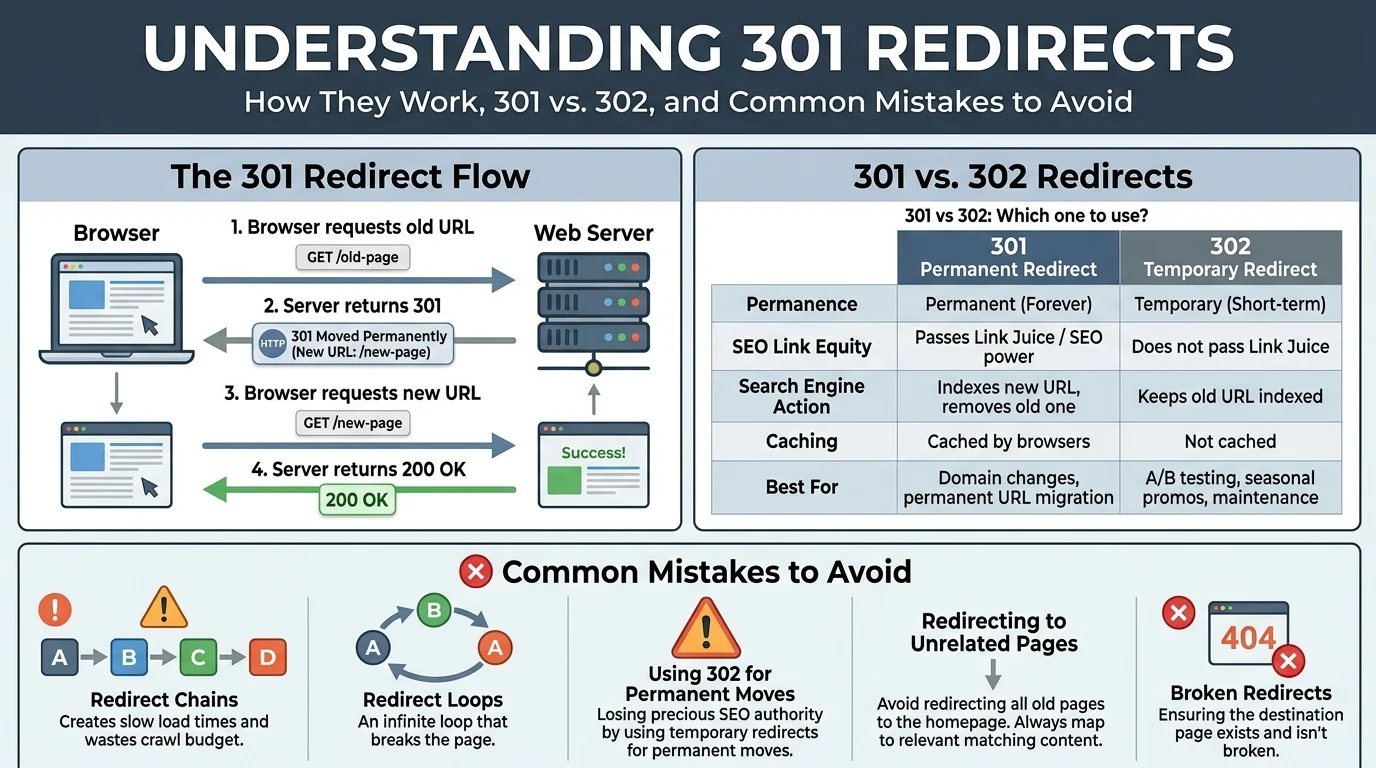
Quick Ans: The 301 Moved Permanently response code is an HTTP status that tells browsers and search engines a page has permanently moved to a new URL. It passes 99% of link equity (PageRank) to the new destination, making it the gold standard for permanent redirects. Key uses: changing domain names, restructuring site architecture, switching from HTTP to HTTPS, and consolidating duplicate content. Always use 301 for permanent moves and 302 for temporary ones.
You have just redesigned your website and every page has a brand-new URL. Your old links are floating around the internet, bookmarked by users, and indexed by Google. Without a proper redirect, those links break. Visitors see error pages. Search rankings plummet. Revenue disappears.
This is where the 301 response code saves the day. A 301 redirect tells browsers and search engines that a page has permanently moved to a new address . It is the digital equivalent of leaving a forwarding address at the post office.
Web developers, SEO specialists, and site owners rely on 301 redirects to preserve search rankings during site changes. When implemented correctly, a 301 passes nearly all link equity to the new page, keeping your SEO intact. When done poorly, it creates redirect chains that slow your site and confuse crawlers. Understanding exactly how 301 works, when to use it, and how to avoid common mistakes is essential for anyone managing a website in 2026.
What Is a 301 Response Code?
1. A Permanent Redirect Status
The 301 status code indicates that a resource has been permanently moved to a new URL .
2. Part of the HTTP Protocol
It is one of several 3xx redirection codes defined in the HTTP specification .
3. Automatically Forwarded by Browsers
When a browser receives a 301 response, it automatically requests the new URL .
4. Search Engines Update Their Index
Google and other search engines replace the old URL with the new one in their index .
5. Passes Link Equity
Approximately 99% of PageRank and link authority transfers to the new URL .
6. Cached by Browsers
Browsers store 301 redirects in their cache, so future requests go directly to the new URL .
7. Different from 302
The 302 code signals a temporary move, while 301 signals a permanent one .
8. Server-Side Implementation
301 redirects are configured on the server, not in the HTML of a page .
9. Invisible to Most Users
Visitors rarely notice a 301 redirect because it happens in milliseconds .
10. Essential for Site Migrations
Domain changes, URL restructuring, and HTTPS migrations all rely on 301 redirects .
11. Supported by All Browsers
Every modern browser handles 301 responses correctly .
12. Recognized by Search Engines
Google, Bing, and other search engines understand and honor 301 redirects .
13. Can Be Temporary If Misused
Using 301 for temporary moves can cause SEO problems if the old URL returns .
14. Not a Meta Tag
A 301 redirect must be implemented at the server level, not with a meta refresh tag .
15. Measurable in Analytics
Redirects can be tracked and monitored through server logs and SEO tools .
How 301 Redirects Work
1. Browser Requests Old URL
A user clicks a link or types the old URL into their browser .
2. Server Recognizes the Redirect
The server sees that the requested URL has a 301 redirect configured .
3. Server Sends 301 Response
The server returns a 301 status code with the new URL in the Location header .
4. Browser Requests New URL
The browser automatically requests the new URL from the server .
5. Server Returns New Page
The server responds with a 200 OK status and the new page content .
6. User Sees the New Page
The user lands on the new page without noticing the redirect .
7. Search Engine Crawler Follows Redirect
When Googlebot encounters a 301, it follows it to the new URL .
8. Index Updated
Google replaces the old URL with the new one in its search index .
9. Link Equity Passed
Link authority from the old URL transfers to the new URL .
10. Browser Caches the Redirect
Future requests for the old URL go directly to the new URL .
11. Redirect Chain Can Form
If the new URL also redirects, a chain forms, which slows page load .
12. Redirect Loops Cause Errors
If URLs redirect to each other, browsers show an error message .
13. Server Load Increases Slightly
Each redirect adds a small amount of server processing time .
14. Monitoring Tools Track Redirects
Tools like Screaming Frog and Ahrefs can audit redirects across a site .
15. Proper Configuration Is Essential
Incorrect configuration can break links and harm SEO .
When to Use 301 Redirects
1. Changing Domain Names
When you move from olddomain.com to newdomain.com, 301 redirects preserve SEO .
2. Switching from HTTP to HTTPS
Every HTTP URL should 301 redirect to its HTTPS equivalent .
3. Restructuring Website URLs
When you reorganize your site architecture, 301 redirects point old URLs to new ones .
4. Consolidating Duplicate Content
If multiple URLs show the same content, 301 redirects consolidate them into one .
5. Removing Pages Permanently
When a page is deleted and won’t return, 301 redirect it to a relevant page .
6. Merging Websites
When combining two sites, 301 redirects move authority from the old site to the new one .
7. Fixing Broken Links
If a page has moved, a 301 redirect fixes the broken link and preserves traffic .
8. Changing URL Structure
Switching from dated URLs to clean URLs requires 301 redirects .
9. Updating Permalinks
When you change a blog post’s permalink, 301 redirect the old URL to the new one .
10. Migrating to a New CMS
Moving from one content management system to another requires 301 redirects .
11. Removing Trailing Slashes
Standardizing URL formats may require 301 redirects to enforce consistency .
12. Fixing www vs non-www Issues
Choose one version and 301 redirect the other to it .
13. Redirecting Old Campaign Pages
After a marketing campaign ends, 301 redirect the landing page to a relevant page .
14. Handling Expired Products
When a product is discontinued, 301 redirect to a similar product or category page .
15. Consolidating Blog Categories
If you merge categories, 301 redirect old category URLs to new ones .
301 vs 302: Key Differences
1. Permanence
301 signals a permanent move; 302 signals a temporary move .
2. Link Equity Transfer
301 passes approximately 99% of link equity; 302 passes none .
3. Search Engine Indexing
301 updates the index to the new URL; 302 keeps the old URL indexed .
4. Browser Caching
301 is cached aggressively; 302 is not cached by default .
5. Use Cases
301 for permanent changes; 302 for temporary ones like maintenance pages .
6. SEO Impact
301 preserves rankings; 302 does not transfer ranking signals .
7. Duration
301 is meant to last indefinitely; 302 is meant to be short-lived .
8. HTTP Status Class
Both are 3xx redirection codes but serve different purposes .
9. Common Mistakes
Using 301 for temporary moves can cause problems if the old URL returns .
10. Analytics Tracking
301 redirects can distort analytics if not properly configured .
11. Implementation Complexity
Both are implemented similarly on the server but serve different strategic purposes .
12. Recommendation
Use 301 for permanent moves and 302 for temporary ones .
13. Impact on Backlinks
301 passes backlink authority; 302 does not .
14. Impact on User Experience
Both redirect users seamlessly, but 301 is cached for faster future loads .
15. When in Doubt
If you are unsure whether a move is permanent, start with 302 and switch to 301 once confirmed .
How to Implement 301 Redirects
1. Apache Server Configuration
Use the .htaccess file with Redirect 301 or RewriteRule directives .
2. Nginx Server Configuration
Use the return 301 or rewrite directives in nginx.conf .
3. WordPress Plugins
Plugins like Redirection, Yoast SEO, and Rank Math simplify 301 setup .
4. CMS-Specific Tools
Many CMS platforms have built-in redirect managers .
5. CDN Configuration
Content delivery networks like Cloudflare offer redirect rules .
6. DNS-Level Redirects
Domain registrars can set up 301 redirects at the DNS level .
7. Server-Side Scripts
PHP, Python, and Node.js can issue 301 responses programmatically .
8. Testing Redirects
Use curl or browser DevTools to verify 301 responses .
9. Bulk Redirects
For large sites, use CSV imports or server config files for bulk redirects .
10. Regex Patterns
Use regular expressions to create flexible redirect rules .
11. Redirect Mapping
Create a spreadsheet mapping old URLs to new URLs before implementation .
12. Preserve Query Strings
Configure redirects to pass query parameters to the new URL .
13. Avoid Redirect Chains
Redirect directly to the final destination, not through multiple hops .
14. Monitor After Implementation
Use tools like Screaming Frog to audit redirects post-launch .
15. Document Everything
Keep records of all redirect rules for future reference .
Common Mistakes to Avoid
1. Redirect Chains
Multiple redirects slow page load and dilute link equity .
2. Redirect Loops
URLs redirecting to each other cause browser errors .
3. Using 302 Instead of 301
Temporary redirects for permanent moves harm SEO .
4. Redirecting to Irrelevant Pages
Redirecting to unrelated content confuses users and search engines .
5. Mass Redirecting to Homepage
Redirecting all old pages to the homepage is a poor user experience .
6. Forgetting Internal Links
Update internal links to point directly to new URLs .
7. Not Updating Sitemaps
Submit updated sitemaps after implementing redirects .
8. Ignoring Mobile Redirects
Ensure redirects work correctly on mobile devices .
9. Overlooking Canonical Tags
Update canonical tags to reflect new URLs .
10. Failing to Test
Always test redirects before and after launch .
11. Redirecting Too Late
Implement redirects at the same time as the URL change .
12. Not Monitoring Errors
Set up monitoring for 404 errors after a migration .
13. Using Meta Refresh
Meta refresh is not a substitute for a proper 301 redirect .
14. Forgetting Redirects for Trailing Slashes
Inconsistent trailing slash usage creates duplicate content .
15. Neglecting Backlink Updates
Reach out to sites linking to old URLs and request updates .
SEO Impact of 301 Redirects
1. Preserves Link Equity
Approximately 99% of PageRank passes through a 301 redirect .
2. Maintains Rankings
Properly implemented 301s help maintain search rankings after a move .
3. Updates Search Index
Google replaces the old URL with the new one in its index .
4. Prevents Duplicate Content
301 redirects consolidate duplicate URLs into one canonical version .
5. Improves Crawl Efficiency
Redirects help crawlers find the correct version of a page .
6. Passes Anchor Text
Link anchor text from old URLs transfers to new URLs .
7. Reduces Bounce Rate
Redirecting users to relevant pages keeps them on your site .
8. Preserves User Experience
Seamless redirects prevent users from hitting error pages .
9. Supports Site Migrations
301 redirects are essential for domain and CMS migrations .
10. Enables HTTPS Migration
301 redirects move traffic from HTTP to HTTPS securely .
11. Consolidates WWW and Non-WWW
301 redirects standardize on one domain version .
12. Fixes Broken Links
Redirects repair broken links and recover lost traffic .
13. Improves Site Architecture
Redirects support URL restructuring without losing SEO value .
14. Facilitates Content Consolidation
301 redirects merge similar content into authoritative pages .
15. Requires Ongoing Maintenance
Redirects should be audited regularly to ensure they still work .
Frequently Asked Questions
What is a 301 response code?
A 301 Moved Permanently status tells browsers and search engines that a page has permanently moved to a new URL .
What is the difference between 301 and 302?
301 signals a permanent move and passes link equity. 302 signals a temporary move and does not pass link equity .
Does a 301 redirect pass link equity?
Yes, approximately 99% of PageRank and link authority transfers through a 301 redirect .
How long does a 301 redirect take to work?
Search engines typically update their index within days to weeks after a 301 is implemented .
Can I use a 301 redirect for a temporary move?
No. Use 302 for temporary moves. Using 301 for temporary moves can cause SEO problems if the old URL returns .
How do I implement a 301 redirect?
Configure it at the server level using .htaccess (Apache), nginx.conf (Nginx), or CMS plugins .
What is a redirect chain?
A redirect chain occurs when a URL redirects to another URL that also redirects, slowing page load and diluting link equity .
What is a redirect loop?
A redirect loop occurs when URLs redirect to each other, causing browsers to show an error .
Should I redirect all old pages to the homepage?
No. Redirect old pages to the most relevant new page to preserve user experience and SEO value .
How do I test a 301 redirect?
Use curl, browser DevTools, or SEO tools like Screaming Frog to verify redirect responses .
Do 301 redirects work for mobile?
Yes, 301 redirects work across all devices and browsers .
How often should I audit redirects?
Audit redirects after any site change and at least quarterly for ongoing maintenance .
Can 301 redirects hurt SEO?
Only if misused. Properly implemented 301s preserve SEO value. Chains, loops, and irrelevant redirects can harm SEO .
Conclusion
The 301 response code is one of the most powerful tools in a web developer’s arsenal. It preserves search rankings, passes link equity, and ensures users always find your content even after URLs change.
Understanding when to use 301 versus 302, how to implement redirects correctly, and what mistakes to avoid separates a smooth site migration from an SEO disaster. Always use 301 for permanent moves, avoid redirect chains and loops, and monitor your redirects after implementation.
Whether you are changing domains, migrating to HTTPS, or restructuring your site, 301 redirects protect your SEO investment. Bookmark this guide and share it with your team. Your next site migration will thank you.
Discover More:
- Threat Hunting vs Incident Response: 7 Key Differences and How They Work Together for Cyber Resilience 2026
- 150+ Best First Response Question Mark Replies for Every Situation 2026

2 thoughts on “301 Response Code: Complete Guide for 2026”