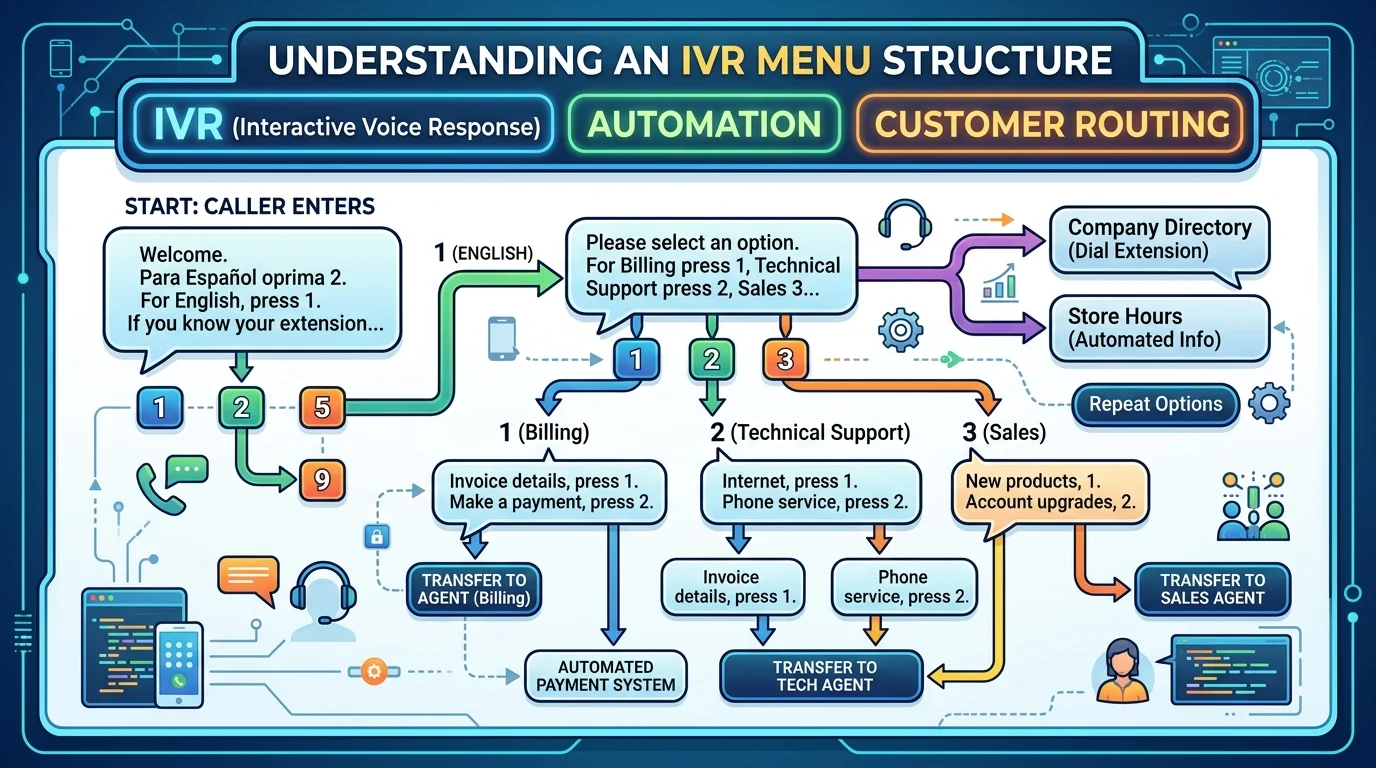
Quick Ans: Need the perfect IVR interactive voice response script right now? Here are 5 top alternatives for different situations: “Thank you for calling [Company]. For sales, press 1. For support, press 2. For billing, press 3.” for general business, “To speak with a representative, press 0 at any time” for customer-friendly design, “All agents are busy. Your estimated wait time is X minutes” for queue management, “Our offices are closed. Please leave a message or visit our website” for after-hours, and “Press 1 for a callback instead of holding” for reducing caller frustration. The right IVR interactive voice response script can transform your customer experience from frustrating to frictionless.
Picture this: a customer calls your business, excited to solve a problem, and instead of a warm welcome, they’re trapped in an endless loop of confusing options. That’s a nightmare scenario. An IVR interactive voice response system is often the first human-like interaction someone has with your brand. Nail it, and you build trust immediately. Get it wrong, and you’re fueling frustration faster than a slow internet connection.
The thing is, more than 75% of customers still prefer using the phone to resolve support issues. Your IVR interactive voice response script is your chance to make that experience seamless, efficient, and even a little pleasant. Whether you run a small plumbing business or a massive contact center, these scripts will help you design a system that customers genuinely appreciate. Let’s dive into ready-to-use templates that work.
Professional Greeting Scripts
1. Thank you for calling [Company Name]. How can I direct your call?
Example: For businesses wanting a clean, straightforward opening
Meaning: Simple and efficient, giving callers immediate direction
2. Welcome to [Company Name]. Please listen carefully as our menu options have changed
Example: When you’ve recently updated your phone system
Meaning: Informs callers of changes while keeping the interaction smooth
3. Thank you for calling [Company Name], where we put customers first
Example: For businesses that want to reinforce brand values
Meaning: Sets a positive tone and emphasizes customer focus
4. You have reached [Company Name]. This call may be monitored for quality and training
Example: Standard professional disclosure for legal compliance
Meaning: Informs callers about recording while maintaining a professional greeting
5. Hello and thank you for calling [Company Name]. All our lines are currently occupied
Example: When you know wait times might be high
Meaning: Prepares callers for a wait while being polite
6. Welcome to [Company Name]. If you know your party’s extension, you may dial it at any time
Example: For companies with internal extensions and direct dialing
Meaning: Speeds up the process for repeat callers who know exactly where to go
7. Thank you for choosing [Company Name]. To better assist you, please select from the following options
Example: A friendly opening for service-based businesses
Meaning: Sets expectation of choice while being helpful
8. You’ve reached the offices of [Company Name]. Our team is ready to help
Example: Warm and welcoming professional environment
Meaning: Creates an approachable tone right from the start
9. [Company Name] customer service line. How may I help you today?
Example: For dedicated support numbers
Meaning: Direct, concise, and action-oriented
Customer Support Scripts
1. For customer support, press 1. And for billing inquiries, press 2. For technical support, press 3
Example: A standard three-option support menu
Meaning: Simple and effective for routing to the right department
2. If you need help with a product or service, please press 1
Example: For general product assistance
Meaning: Groups all product-related queries together for routing
3. For returns, exchanges, or order questions, press 1. For warranty support, press 2
Example: For retail or e-commerce businesses
Meaning: Separates sales-related issues from warranty issues
4. Please press 1 for existing customer support or 2 for new customer inquiries
Example: For businesses that handle both segments differently
Meaning: Segments callers by their relationship with the company
5. For emergency support, press 1 to connect with an on-call technician immediately
Example: For urgent, time-sensitive situations
Meaning: Gives priority routing to emergencies
6. To check your account balance, press 1. To report a lost or stolen card, press 2
Example: For financial institutions
Meaning: Routes high-volume routine tasks efficiently
7. For help resetting your password or accessing your account, press 1
Example: For digital services with common login issues
Meaning: Prioritizes frequent, high-volume support requests
8. To speak with a representative about a complex issue, press 0
Example: For customers who need human assistance quickly
Meaning: Provides a direct path to a live agent
9. For product registration or activation, press 1. For troubleshooting guides, press 2
Example: For electronics or software companies
Meaning: Separates simple and potentially complex support needs
10. If you’re calling about an order delivery, please press 1. For order changes, press 2
Example: For e-commerce businesses managing logistics
Meaning: Routes fulfillment queries efficiently
Sales and Billing Scripts
1. To make a payment, press 1. For billing questions, press 2
Example: For any business that processes payments
Meaning: Separates transactional inquiries from informational ones
2. For new sales or product information, press 1. For existing orders, press 2
Example: For businesses growing their customer base
Meaning: Directs new and existing customers appropriately
3. Please press 1 to speak with a sales representative or 2 for current customer support
Example: For inbound sales and support teams
Meaning: Prioritizes sales calls without isolating existing customers
4. For billing and account inquiries, press 1. For technical support, press 2
Example: Standard two-department routing
Meaning: Clear division between money and technical issues
5. To complete your transaction, please enter your account number followed by the pound key
Example: For automated payment systems
Meaning: Secures payment processing while maintaining efficiency
6. If you’d like to schedule a consultation or demo, press 1
Example: For service-based sales processes
Meaning: Routes high-value lead inquiries directly
7. For questions about your invoice, press 1. For payment arrangements, press 2
Example: For companies with flexible payment options
Meaning: Offers support for both standard and special billing situations
8. If you’re ready to place an order, press 1. If you need help choosing a product, press 2
Example: For businesses with varying customer needs
Meaning: Routes self-service and assisted purchase paths
9. To check your account balance, press 1. To make a transfer, press 2. For other transactions, press 3
Example: For financial institutions
Meaning: Covers the most common banking interactions
10. For sales, press 1. For support, press 2. And for all other inquiries, press 3
Example: Simple three-option routing structure
Meaning: Covers the main business functions with an “other” option
Callback and Hold Scripts
1. All agents are currently assisting other callers. Please hold, and we’ll be with you shortly
Example: Standard hold announcement
Meaning: Manages expectations during busy periods
2. Your estimated wait time is approximately [X] minutes. Please continue to hold
Example: When you have accurate wait time data
Meaning: Sets clear expectations and reduces uncertainty
3. If you’d prefer a callback instead of holding, please press 1
Example: Reducing caller frustration with a virtual queue
Meaning: Offers an alternative to waiting on hold
4. We apologize for the delay. Your call is important to us
Example: Acknowledging longer than expected wait times
Meaning: Shows empathy while maintaining professional tone
5. Press 1 to leave a message and we’ll return your call today
Example: For overflow situations when wait times get long
Meaning: Provides an alternative when hold times exceed capacity
6. Your current position in the queue is [number]. You have approximately [number] minutes remaining
Example: For call centers with queue position tracking
Meaning: Gives callers a concrete expectation to reduce anxiety
7. Please don’t hang up. You will be connected to the next available agent
Example: Encouraging callers to stay on the line
Meaning: Reduces abandonment rates by offering reassurance
8. If you would like to receive a callback when an agent becomes available, press 1
Example: Efficient virtual queuing
Meaning: Frees up phone lines and reduces customer frustration
9. While you wait, you can also visit our website for self-service options
Example: Diverting simple requests to digital channels
Meaning: Helps customers help themselves during hold times
10. All of our agents are currently busy. Your estimated hold time is [X] minutes
Example: Standard queue management
Meaning: Direct and informative about what to expect
Natural Language and AI-Powered Scripts
1. How can I help you today? Please tell me what you need in your own words
Example: For AI-powered IVR systems with speech recognition
Meaning: Allows natural, conversational interactions
2. Tell me a few words about why you’re calling, and I’ll connect you to the right person
Example: For modern, intent-based routing systems
Meaning: Uses AI to understand caller needs without rigid menus
3. If you know your party’s extension, you can say it now or dial it at any time
Example: For businesses with internal extensions
Meaning: Adds speech recognition to a classic feature
4. Please say or enter your account number
Example: For account-based routing systems
Meaning: Offers dual input options for flexibility
5. Just tell me what you need help with today
Example: Open-ended prompt for natural language processing
Meaning: Simple, friendly, and technologically advanced
6. If you’re calling about your order, just say “order” or press 1
Example: For businesses with high volume in specific categories
Meaning: Uses the customer’s natural phrasing to route them faster
7. Please describe your issue in a sentence or two
Example: For collecting intents in complex support scenarios
Meaning: Leverages AI for better understanding
8. For faster service, say what you’re calling about or press 1 for general options
Example: A hybrid approach for modern systems
Meaning: Gives callers a choice between speaking naturally or using menus
9. You can interrupt at any time by saying your choice
Example: For speech-recognition IVR that allows barge-in
Meaning: Speeds things up for repeat or experienced callers
10. I’ll connect you to the best team based on what you just told me
Example: Reassuring callers after a natural language interaction
Meaning: Builds trust by explaining how the system works
Appointment and Scheduling Scripts
1. To schedule a new appointment, press 1. To confirm or change an existing appointment, press 2
Example: For service-based businesses like healthcare or repairs
Meaning: Covers the main scheduling needs
2. If you need to reschedule your appointment, please press 1
Example: For avoiding no-shows and managing reschedules
Meaning: Directs cancellations and changes properly
3. For appointment reminders or confirmations, press 1
Example: For businesses using automated reminders
Meaning: Routes calls for automated confirmations
4. If you’re calling to check availability, press 1. To book a time, press 2
Example: For businesses with varying capacity
Meaning: Separates information-seeking from booking actions
5. To speak with the scheduling department, press 1. For other inquiries, press 2
Example: For businesses where scheduling is a key function
Meaning: Identifies the scheduling team as a distinct unit
6. Please enter your appointment confirmation number
Example: For streamlining the check-in process
Meaning: Uses input to efficiently look up appointments
7. If you need to cancel your appointment, press 1. To reschedule, press 2
Example: For managing cancellations separately from reschedules
Meaning: Keeps the flow clear for high-volume scheduling changes
8. For immediate appointment booking, press 1. For future scheduling, press 2
Example: For businesses dealing with urgent and non-urgent requests
Meaning: Routes calls based on urgency
9. If this is a medical emergency, please hang up and dial 911
Example: For healthcare practices
Meaning: Sets clear expectations about service boundaries
10. To hear our upcoming availability, press 1. To speak with a scheduler, press 2
Example: For businesses with automated and live scheduling options
Meaning: Offers both self-service and human options
After-Hours and Holiday Scripts
1. Our offices are currently closed. Our regular business hours are [hours] from [days]
Example: For standard after-hours messages
Meaning: Sets clear expectations for when service resumes
2. You have reached us outside of our regular hours. Please leave a message
Example: For businesses that don’t offer 24/7 support
Meaning: Directs callers to voicemail
3. Our offices are closed for [holiday name]. We will reopen on [date] at [time]
Example: For holiday closures
Meaning: Covers temporary closures
4. If this is an urgent matter, please press 1 to connect with our on-call team
Example: For businesses with emergency coverage
Meaning: Routes urgent calls even when the main office is closed
5. To leave a voicemail message, press 1. We will return your call on the next business day
Example: For after-hours voicemail routing
Meaning: Manages expectations about response timing
6. For immediate assistance, please visit our website at [URL] for self-service resources
Example: For after-hours digital self-service
Meaning: Directs customers to online options
7. We are currently experiencing high call volume. Our business hours are [hours]
Example: For businesses closed but with overflow
Meaning: Covers both high-volume and after-hours scenarios
8. For urgent technical support outside of business hours, please press 1
Example: For IT or tech support teams
Meaning: Routes emergencies separately from general issues
9. Our offices will be closed from [start date] to [end date]. We’ll return on [date]
Example: For extended closures like company offsites
Meaning: Covers longer periods of unavailability
10. You can leave a voicemail now, and we’ll be in touch as soon as we reopen
Example: Simple closure message with clear instructions
Meaning: Provides a clear path for customer contact during closures
Self-Service and Automation Scripts
1. To check your account balance, press 1. For recent transactions, press 2
Example: For financial services with self-service options
Meaning: Automates the most frequent, simple tasks
2. For order status, enter your order number now
Example: For e-commerce businesses
Meaning: Speeds up support for the most common inquiry
3. If you’d like to hear these options again, press 9
Example: For helping customers who missed a menu choice
Meaning: Allows callers to replay options without confusion
4. For product availability, press 1. For pricing information, press 2
Example: For retail businesses with large inventories
Meaning: Automates common pre-sales questions
5. Please enter your tracking number to receive a delivery update
Example: For logistics and shipping companies
Meaning: Offers automated tracking without agent involvement
6. To listen to our FAQ, press 1. For current promotions, press 2
Example: For companies with frequent, straightforward questions
Meaning: Provides automated access to common information
7. For store locations and hours, press 1
Example: For chains with multiple locations
Meaning: Automates location-based information requests
8. To register your product, press 1. For warranty information, press 2
Example: For consumer goods companies
Meaning: Automates registration and warranty lookups
9. If you’d like us to send you a link to our self-service portal, press 1
Example: For digital-first service experiences
Meaning: Moves customers to digital channels for efficiency
10. For general information, please press 1. To speak to a team member, press 0
Example: A simple branching structure for basic and complex needs
Meaning: Starts with self-service and ends with human help
Menu Structuring Scripts
1. To reach the right department, please select from the following options
Example: Standard menu introduction
Meaning: Sets up the menu system for callers
2. For sales, press 1. For support, press 2. And for billing, press 3
Example: Simple, industry-standard routing
Meaning: Clear and direct to reduce confusion
3. If you know your party’s extension, you may dial it at any time
Example: For businesses with internal phone systems
Meaning: Bypasses menus for repeat or internal callers
4. Press 1 for English. Press 2 for Spanish
Example: For businesses serving multilingual customers
Meaning: Offers language selection up front
5. For reservations, press 1. And for customer support, press 2. For group bookings, press 3
Example: For hospitality and travel businesses
Meaning: Segments by customer type and purpose
6. For technical support, press 1. For billing support, press 2. And for general inquiries, press 3
Example: Industry-standard tech support routing
Meaning: Clear division of support functions
7. For a live agent at any time, press 0
Example: The “zero out” option for reaching a human
Meaning: Provides a safety net for frustrated callers
8. To hear these options again, press 9. To return to the main menu, press [key]
Example: For nested menu systems
Meaning: Helps callers navigate without getting lost
9. Press 1 for new orders. Press 2 for order changes. And press 3 for order cancellations
Example: For businesses handling order management
Meaning: Directs calls by the specific action needed
10. For the operator, press 0 at any time
Example: The classic operator shortcut
Meaning: The most familiar way for callers to reach a human
Transfer and Escalation Scripts
1. I’ll connect you now. Please stay on the line
Example: For transferring to another department
Meaning: Sets expectations for what happens next
2. Let me transfer you to a specialist who can help with your question
Example: For handing off more complex issues
Meaning: Reassures callers they’re being moved to the right person
3. You’re being transferred to our [department] team. Please hold
Example: For directing callers to the right group
Meaning: Explains where they’re going
4. For account security verification, please enter your account number
Example: For validating callers before transfers
Meaning: Ensures the right information is ready for the agent
5. To ensure we get you to the right department, please say what you need help with
Example: For AI-powered transfer systems
Meaning: Uses intent to route accurately
6. I’m routing your call now. Thank you for your patience
Example: For transitions between automated menus
Meaning: Comforts the caller during the transfer
7. If you need to return to the main menu, press [key]
Example: For nested menu navigation
Meaning: Offers a route back if they made a mistake
8. You are now being transferred. Please wait for the next available agent
Example: Standard transfer language
Meaning: Communicates what’s happening
9. For faster service, please have your account number ready when you reach the agent
Example: For preparing callers before the transfer
Meaning: Speeds up the call once they reach the human
10. I’ll connect you now. If you get disconnected, please call us back
Example: For when transfers might have issues
Meaning: Prepares them for a potential drop
Polite and Empathetic Scripts
1. We sincerely apologize for the wait. Your time is valuable to us
Example: When a caller has been on hold too long
Meaning: Shows empathy for longer wait times
2. Thank you for your patience. We appreciate you waiting
Example: For when wait times are known
Meaning: Shows appreciation for cooperation
3. I’m sorry to keep you waiting. An agent will be with you shortly
Example: For regular wait situations
Meaning: Apologizes and sets expectation
4. We understand that your time is valuable. We’ll be with you as soon as possible
Example: For managing busy periods
Meaning: Acknowledges the customer’s inconvenience
5. Thank you for calling. We appreciate your business
Example: A closing or opening with warmth
Meaning: Ends or starts the call positively
6. We know how frustrating technical issues can be. We’re here to help
Example: For support centers handling repairs
Meaning: Shows understanding of the customer’s problem
7. Your question is important to us. We’ll get you to the right person
Example: For before a transfer
Meaning: Reassures the caller they’re in good hands
8. We care about your experience. Please share your feedback at the end of the call
Example: For gathering customer satisfaction data
Meaning: Shows commitment to improvement
9. Thank you for choosing [Company Name]. We’re here to support you
Example: For all calls
Meaning: Warm, professional, and customer-centered
10. We understand that this situation is important to you
Example: For before a complex issue resolution
Meaning: Shows empathy and understanding
Call Closure Scripts
1. Thank you for calling. Have a great day
Example: Standard call ending
Meaning: Polished, friendly closure
2. If you need further assistance, please call us back at this number
Example: For when the issue isn’t fully resolved
Meaning: Leaves the door open for follow-up
3. Please take a moment after the call to complete our brief survey
Example: For gathering feedback on customer experience
Meaning: Requests participation in satisfaction measurement
4. We appreciate your business. Goodbye
Example: Warm but quick closure
Meaning: Ends the call with a positive note
5. If you’re satisfied with your experience, press 1. If not, press 2
Example: For after-call satisfaction surveys
Meaning: Simple, fast feedback mechanism
6. For more information, please visit our website. Thank you
Example: For when no other action is needed
Meaning: Directs to additional resources
7. We’re here for you 24/7. Call us anytime you need support
Example: For businesses with round-the-clock coverage
Meaning: Reinforces availability
8. We hope we were able to resolve your question today. Thank you for calling
Example: For service completions
Meaning: Acknowledges resolution and ends positively
9. If you have additional questions, please press 1 to return to the main menu
Example: For self-service completions
Meaning: Offers a path back if they need more
10. Our team is always happy to help. Have a wonderful day
Example: For all calls
Meaning: Leaves a lasting positive impression
FAQs
What is an IVR interactive voice response system?
It’s an automated phone system that interacts with callers, gathers information, and routes calls to the right person or department. It can use voice input or keypad selections to direct callers.
Why is a well-designed IVR script important?
Your IVR is often a customer’s first interaction with your company. A good script reduces wait times, increases first-call resolution, and improves customer satisfaction. Poorly designed IVRs confuse customers and increase call abandonment.
How many menu options should my IVR have?
Keep it to three to five options per menu level. Too many choices overwhelm callers. If you have more than five, consider a multi-level IVR design.
Should I always offer a way to reach a live agent?
Absolutely. Always include a “zero out” option or way for callers to reach a human. Customers want to know they won’t get stuck in an automated loop.
What are natural language IVR scripts?
These use AI and speech recognition to let callers speak naturally, like saying “I need help with my order” rather than pressing numbered options. They feel more human and conversational.
How can I reduce caller frustration with my IVR?
Keep options short and clear, use a natural-sounding voice, offer a way to reach a live agent, provide estimated wait times, and offer callback options to avoid long holds.
Conclusion
Your IVR interactive voice response script shapes how customers perceive your entire business. A thoughtfully designed system shows respect for their time and builds trust from the very first interaction. Implementing the right scripts can reduce operational costs while dramatically improving satisfaction metrics.
Businesses across sectors are seeing real results. One major financial institution achieved a 24% increase in IVR self-service adoption and a 36% reduction in agent-handled calls by modernizing its system. Another saw an 8-point increase in its Net Promoter Score and a 44% decrease in attrition after revamping its IVR.
The scripts above give you a strong foundation. Adapt them to your specific business needs and test what works best. Keep it simple, always offer a human path, and never underestimate how a friendly voice recording can build customer loyalty. Your IVR is your brand’s virtual receptionist. Make sure it’s a good one.

2 thoughts on “200+ IVR Interactive Voice Response Scripts for Every Business Scenario in 2026”