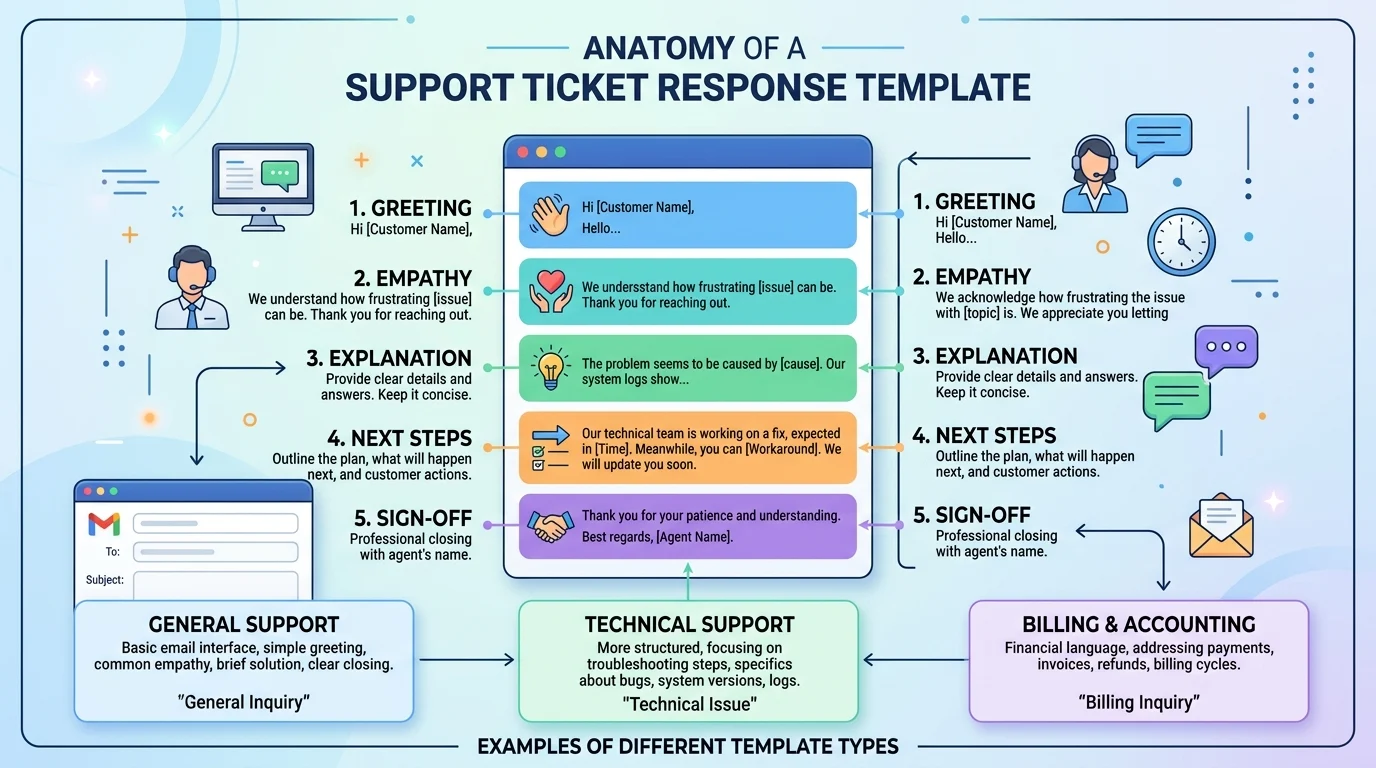
Quick Ans: A support ticket response template is a pre-written message structure that customer support agents use to reply to common customer issues quickly and consistently. Key types include acknowledgment templates, resolution templates, escalation templates, apology templates, and follow-up templates. Good templates include a greeting, empathy statement, clear explanation, actionable next steps, and a professional sign-off. Templates reduce response time by up to 50%, improve consistency, and boost customer satisfaction when personalized properly.
Every support agent knows the feeling. You open your queue and see 47 tickets waiting. Each one needs a thoughtful, personalized response. But writing every reply from scratch would take hours you don’t have.
Support ticket response templates solve this problem. They give agents a proven structure to start from, so they can focus on personalizing the details instead of reinventing the wheel for every customer. Templates aren’t about sounding robotic. They’re about saving time on the structure so you can invest energy in the human connection.
Research shows that customers expect fast responses. Acknowledgment templates let you confirm receipt within minutes, even if the full resolution takes longer. Resolution templates ensure you cover all necessary steps without forgetting critical information. Escalation templates keep customers informed when their issue needs specialist attention.
The key is using templates as a foundation, not a script. Personalization, empathy, and clear communication turn a generic template into a genuine customer interaction. This guide covers everything you need to build and use support ticket response templates effectively.
What Is a Support Ticket Response Template?
1. A Pre-Written Message Structure
A support ticket response template is a reusable format for replying to common customer issues .
2. Not a Script
Templates provide structure, not word-for-word scripts. Agents personalize each response .
3. Saves Time on Structure
Agents don’t have to compose every reply from scratch, reducing response time significantly .
4. Ensures Consistency
Templates guarantee that every customer receives the same quality of communication .
5. Covers Common Scenarios
Templates exist for acknowledgments, resolutions, escalations, apologies, and follow-ups .
6. Includes Key Elements
Good templates include greeting, empathy, explanation, next steps, and sign-off .
7. Customizable by Brand Voice
Templates can be adapted to match your company’s tone, whether formal or casual .
8. Stored in Help Desk Software
Most ticketing systems like Zendesk, Freshdesk, and Help Scout allow saved replies .
9. Accessible to All Agents
Templates democratize good communication across team experience levels .
10. Updated Regularly
Templates should evolve as products, policies, and customer expectations change .
11. Measurable Impact
Templates reduce average handle time and improve customer satisfaction scores .
12. Used Across Channels
Templates work for email, chat, social media, and phone support .
13. Personalization Is Essential
The best templates leave room for agent-specific details and customer context .
14. Compliance-Friendly
Templates help ensure regulatory and policy language is included consistently .
15. Onboarding Tool
New agents learn faster when they have templates to reference .
Types of Support Ticket Response Templates
1. Acknowledgment Templates
Confirm receipt of the ticket and set expectations for response time .
2. Resolution Templates
Provide the solution or answer to the customer’s issue .
3. Apology Templates
Express genuine regret for inconvenience, delays, or errors .
4. Escalation Templates
Inform customers their issue is being transferred to a specialist .
5. Follow-Up Templates
Check in after resolution to ensure satisfaction .
6. Request for Information Templates
Ask for additional details needed to resolve the issue .
7. Delay Notification Templates
Inform customers of delays and provide updated timelines .
8. Refund and Return Templates
Explain refund or return processes clearly and compassionately .
9. Technical Issue Templates
Guide customers through troubleshooting steps .
10. Billing Inquiry Templates
Address questions about charges, invoices, or payment issues .
11. Feature Request Templates
Acknowledge suggestions and explain how feedback is handled .
12. Cancellation Templates
Process cancellations while attempting to retain the customer .
13. Welcome Templates
Greet new customers and set expectations for support .
14. Reopened Ticket Templates
Acknowledge that a previously closed issue has been reopened .
15. Out of Office Templates
Inform customers of delayed response during holidays or emergencies .
Key Elements of Effective Templates
1. Personalized Greeting
Use the customer’s name. Avoid “Dear Customer” or generic salutations .
2. Empathy Statement
Acknowledge the customer’s frustration or inconvenience .
3. Clear Explanation
Explain what happened or what you’re doing in plain language .
4. Actionable Next Steps
Tell the customer exactly what happens next and what they need to do .
5. Timeline Expectations
Provide clear timeframes for resolution or follow-up .
6. Contact Information
Include how to reach you if they have further questions .
7. Professional Sign-Off
Close with a courteous sign-off and your name .
8. Brand Voice Consistency
Match your company’s tone, whether formal, friendly, or casual .
9. No Jargon
Avoid technical terms the customer won’t understand .
10. Positive Language
Frame messages positively. Say what you can do, not what you can’t .
11. Clear Subject Lines
Make it easy for customers to identify the ticket topic .
12. Ticket Reference Number
Include the ticket number for easy tracking .
13. Apology When Appropriate
Don’t over-apologize, but acknowledge genuine mistakes .
14. Solution-Focused Tone
Focus on resolution, not blame .
15. Personalization Placeholders
Leave room for agent-specific details and customer context .
Support Ticket Response Template Examples
1. Acknowledgment Template
“Hi [Name], thanks for reaching out. I’ve received your ticket about [issue] and I’m looking into it now. You can expect an update from me within [timeframe]. Thanks for your patience.”
2. Resolution Template
“Hi [Name], great news. I’ve resolved your issue with [problem]. Here’s what I did: [steps]. You should now be able to [desired outcome]. Let me know if you need anything else.”
3. Apology Template
“Hi [Name], I’m truly sorry for the inconvenience this caused. I understand how frustrating [issue] must be. Here’s what I’m doing to fix it: [action]. Thank you for your patience.”
4. Escalation Template
“Hi [Name], thanks for your patience. Your issue requires specialist attention, so I’ve escalated it to our [team] team. They’ll be in touch within [timeframe]. Your ticket number is [number].”
5. Follow-Up Template
“Hi [Name], I wanted to check in and make sure everything is working well after we resolved your issue. Is there anything else I can help with?”
6. Request for Information Template
“Hi [Name], thanks for contacting us. To resolve your issue, I need a bit more information: [questions]. Once I have this, I can move forward with a solution.”
7. Delay Notification Template
“Hi [Name], I wanted to update you on your ticket. We’re experiencing a delay due to [reason]. I’m still working on it and will update you by [time]. Thanks for your understanding.”
8. Refund Template
“Hi [Name], I’ve processed your refund for [amount]. You should see it in your account within [timeframe]. I’m sorry for the inconvenience and hope we can do better next time.”
9. Technical Issue Template
“Hi [Name], let’s get this fixed. Please try these steps: [steps]. If the issue persists, reply with a screenshot and I’ll investigate further.”
Best Practices for Using Templates
1. Personalize Every Response
Always use the customer’s name and reference their specific issue .
2. Match Tone to Situation
Use empathetic language for complaints and celebratory language for positive feedback .
3. Avoid Sounding Robotic
Vary sentence structure and add natural language .
4. Keep It Concise
Respect the customer’s time. Get to the point quickly .
5. Proofread Before Sending
Typos undermine professionalism and trust .
6. Update Templates Regularly
Products change. Policies change. Templates should too .
7. Train Agents on Customization
Templates are starting points, not final drafts .
8. Gather Agent Feedback
Agents know what works. Involve them in template creation .
9. Track Template Performance
Monitor response times, resolution rates, and satisfaction scores .
10. Use Canned Responses for Common Issues
Save time on repetitive questions with pre-approved answers .
11. Avoid Over-Apologizing
Excessive apologies can sound insincere. Acknowledge and move to solution .
12. Include Clear Next Steps
Customers should know exactly what happens next .
13. Follow Up After Resolution
A quick check-in builds loyalty and catches recurring issues .
14. Respect Cultural Differences
Adjust tone for international customers when needed .
15. Measure and Iterate
Use data to refine templates continuously .
Common Mistakes to Avoid
1. Copy-Pasting Without Personalization
Customers can tell when they receive a generic response .
2. Using Jargon
Technical terms confuse customers and increase follow-up tickets .
3. Being Defensive
Never blame the customer or make excuses .
4. Over-Apologizing
Too many apologies dilute the message and sound insincere .
5. Ignoring the Customer’s Emotion
If they’re frustrated, acknowledge it before jumping to solutions .
6. Forgetting the Ticket Number
Always reference the ticket for tracking and clarity .
7. Missing Next Steps
Customers should never wonder what happens next .
8. Using All Caps or Excessive Punctuation
This reads as shouting or unprofessional .
9. Delaying Responses
Even an acknowledgment template buys time if sent quickly .
10. Failing to Follow Up
Resolution without follow-up leaves customers wondering if you care .
Frequently Asked Questions
What is a support ticket response template?
A pre-written message structure that agents use to reply to common customer issues quickly and consistently .
Why should I use support ticket templates?
Templates reduce response time, ensure consistency, and improve customer satisfaction when personalized properly .
Are templates robotic?
Not if used correctly. Templates provide structure, but agents must personalize each response .
How many templates should I have?
Start with 10-15 covering your most common scenarios. Add more as needed .
Where should I store templates?
In your help desk software like Zendesk, Freshdesk, or Help Scout for easy access .
How often should I update templates?
Review them quarterly or whenever products, policies, or customer expectations change .
Can templates work for live chat?
Yes, but keep them shorter for chat. Customers expect faster, more conversational replies .
What’s the difference between a template and a macro?
Templates are message structures. Macros often include automated actions like tagging or assigning tickets .
How do I avoid sounding robotic?
Personalize with the customer’s name, reference their specific issue, and vary sentence structure .
Should I apologize in every response?
No. Apologize when appropriate, but don’t over-apologize. Focus on solutions .
Can templates improve CSAT scores?
Yes. Faster responses, consistent quality, and clear communication all boost satisfaction .
What if my template doesn’t fit the situation?
Templates are starting points. Adapt them or write a custom response when needed .
How do I train new agents on templates?
Include templates in onboarding, role-play scenarios, and provide feedback on customization .
Are templates compliant with data privacy laws?
Templates themselves aren’t the issue. Ensure you don’t include personal data in saved replies .
What’s the biggest mistake with templates?
Copy-pasting without personalization. Customers notice and feel undervalued .
Conclusion
Support ticket response templates are a support agent’s secret weapon. They save time, ensure consistency, and free up mental energy for what matters most: connecting with customers. From acknowledgment templates that buy you time to resolution templates that deliver solutions, the right template for every scenario makes your support team faster and more effective.
The key is balance. Use templates as a foundation, not a replacement for human interaction. Personalize every response. Reference the customer’s specific issue. Match your tone to their emotional state. A well-crafted template plus a genuine human touch equals a customer experience that builds loyalty.
Start by identifying your most common ticket types. Build templates for each. Train your team on customization. Track performance and iterate. Your response times will drop, your satisfaction scores will rise, and your agents will thank you for making their jobs easier. Share this guide with your support team, and bookmark it for your next template refresh.
Discover More:
- AI Text Response Generator: Complete Guide for 2026
- Exposure and Response Prevention Training: Complete Guide for 2026
