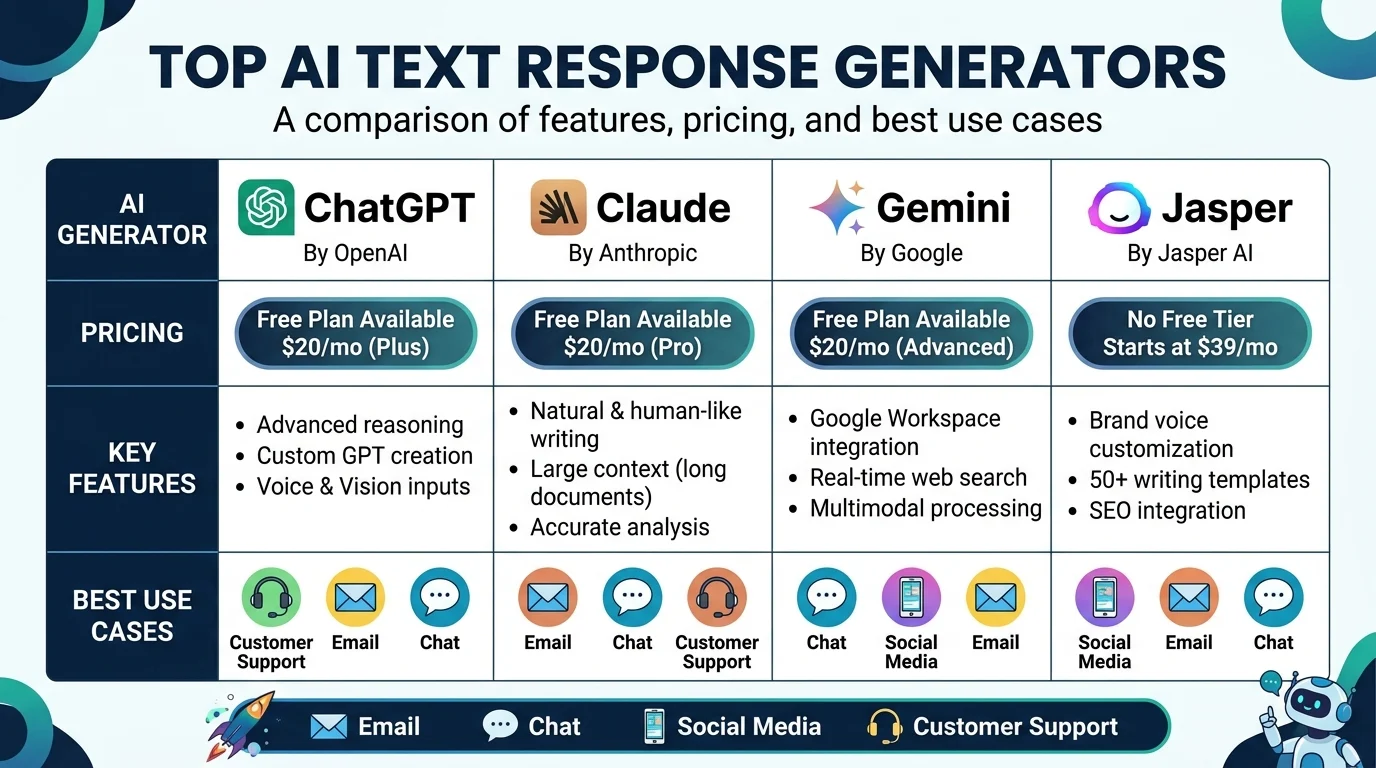
Quick Ans: An AI text response generator is a tool that uses artificial intelligence to create human-like written replies for emails, chats, social media, and customer support. Top options include ChatGPT, Google Gemini, Claude, Jasper, and Copy.ai. Key features to look for: tone customization, multi-language support, CRM integration, and plagiarism checking. Most tools offer free tiers, with paid plans starting around $10-20 per month. The global AI writing assistant market is projected to exceed $5 billion by 2027.
You’re staring at an empty reply box. A customer is upset. Your boss needs a polished email. Your Instagram DMs are piling up. And your brain has officially left the chat. Sound familiar? This is where an AI text response generator becomes your secret weapon.
These tools have exploded in popularity, and for good reason. They can draft professional emails in seconds, craft witty social media replies, and handle customer service tickets around the clock. Whether you’re a busy entrepreneur, a social media manager, or someone who just hates writing, an AI text response generator can save hours every week.
But here’s the catch: not all generators are created equal. Some produce robotic nonsense. Others nail your brand voice perfectly. Understanding what these tools do, how they work, and which one fits your needs is essential before you commit. Let’s break down everything you need to know.
What Is an AI Text Response Generator?
1. A Tool That Creates Written Replies
It uses artificial intelligence to generate human-like text responses for various communication channels.
2. Powered by Large Language Models
Most generators run on LLMs like GPT-4, Claude, or Gemini that understand context and intent.
3. Handles Multiple Formats
From short chat replies to long-form emails, these tools adapt to different length requirements.
4. Learns From Your Input
The more context you provide, the better the generated response matches your needs.
5. Customizable Tone and Style
Users can specify whether they want formal, casual, funny, empathetic, or professional output.
6. Supports Multiple Languages
Most modern generators handle dozens of languages, making them useful for global teams.
7. Integrates With Existing Tools
Many connect to Gmail, Slack, HubSpot, Zendesk, and other platforms for seamless workflow.
8. Available as Standalone or Built-In
You can use dedicated apps or features built into tools you already use.
9. Trained on Massive Datasets
These models have processed billions of text examples to learn human communication patterns.
10. Continuously Improving
Regular updates and fine-tuning make these tools smarter over time.
11. Not a Replacement for Human Judgment
AI generates drafts, but humans should review and personalize before sending.
12. Scalable for Teams
Business plans allow multiple users with shared brand voice settings.
13. Privacy-Focused Options Exist
Enterprise versions offer data isolation and compliance certifications.
14. Cost-Effective Alternative
Replaces hours of writing time for a fraction of the cost of hiring writers.
15. Evolving Rapidly
New features like sentiment analysis and predictive replies launch frequently.
Top AI Text Response Generators in 2026
1. ChatGPT (OpenAI)
The most popular option with GPT-4o and GPT-5 models. Excels at conversational replies, creative writing, and complex reasoning. Free tier available; Plus at $20/month.
2. Google Gemini
Deeply integrated with Google Workspace. Great for Gmail replies, Google Docs drafting, and search-enhanced responses. Free with Google account; Advanced at $19.99/month.
3. Claude (Anthropic)
Known for nuanced, thoughtful responses and strong safety features. Excellent for professional and sensitive communications. Free tier available; Pro at $20/month.
4. Jasper
Built for marketing teams with brand voice customization. Generates on-brand replies for social media, ads, and email campaigns. Starts at $39/month.
5. Copy.ai
Focused on sales and marketing copy. Offers workflow automation for repetitive response tasks. Free tier available; Pro at $49/month.
6. Writesonic
All-in-one platform with SEO integration. Good for blog comments, social replies, and customer emails. Free tier available; paid from $16/month.
7. Rytr
Budget-friendly option with 40+ use cases. Great for quick replies and short-form content. Free tier; Unlimited at $9/month.
8. ShortlyAI
Focused on long-form writing with a “director” mode for real-time collaboration. Best for detailed email responses.
9. Neuroflash
European option with strong text and image generation. Good for multilingual teams. Free tier available.
10. Anyword
Performance-focused with predictive analytics. Shows which responses are likely to convert. Starts at $39/month.
11. TextCortex
Browser extension that works across websites. Great for responding in Gmail, LinkedIn, and Twitter. Free tier available.
12. HyperWrite
Personal assistant style with real-time suggestions. Good for email and chat responses. Free tier; Premium at $19.99/month.
13. Compose AI
Chrome extension for autocompletion across platforms. Speeds up typing with AI predictions. Free tier available.
14. Notion AI
Built into Notion workspace. Great for internal team communications and project updates. Add-on at $10/month.
15. MemGPT
Memory-focused AI that remembers past conversations. Ideal for customer support continuity.
Key Features to Look For
1. Tone Customization
Can you specify formal, casual, funny, empathetic, or professional tones?
2. Brand Voice Training
Does the tool learn your unique writing style and vocabulary?
3. Multi-Language Support
How many languages does it handle fluently?
4. Platform Integration
Does it connect to your email, CRM, help desk, or social tools?
5. Response Length Control
Can you set word or character limits for different channels?
6. Plagiarism Checking
Does it ensure generated content is original?
7. Sentiment Analysis
Can it detect the emotional tone of incoming messages?
8. Context Awareness
Does it remember previous messages in a thread?
9. Bulk Generation
Can it create multiple responses at once for high-volume needs?
10. Team Collaboration
Does it support shared workspaces and approval workflows?
11. Data Privacy
Does it offer GDPR, HIPAA, or SOC 2 compliance?
12. API Access
Can you integrate it into your own applications?
13. Offline Mode
Does it work without an internet connection?
14. Pricing Transparency
Are costs clear with no hidden fees?
15. Free Trial Availability
Can you test before committing?
How to Choose the Right Generator
1. Define Your Primary Use Case
Customer support, social media, email marketing, or personal use?
2. Assess Your Volume Needs
How many responses do you generate daily or weekly?
3. Check Integration Requirements
Does it work with your existing tools?
4. Evaluate Budget Constraints
Free, mid-range, or enterprise pricing?
5. Test Multiple Options
Use free trials to compare output quality.
6. Read User Reviews
Check G2, Capterra, and Trustpilot for real feedback.
7. Consider Team Size
Solo users have different needs than 50-person teams.
8. Look for Scalability
Will it grow with your business?
9. Check Language Requirements
Do you need multi-language support?
10. Review Privacy Policies
How is your data handled and stored?
11. Assess Output Quality
Does it sound human or robotic?
12. Test Edge Cases
How does it handle sensitive or complex topics?
13. Evaluate Customer Support
Is help available when you need it?
14. Consider Long-Term Costs
Monthly fees add up over time.
15. Trust Your Instincts
If it feels wrong during the trial, it probably is.
Benefits of Using AI Text Response Generators
1. Saves Time
Draft responses in seconds instead of minutes or hours.
2. Improves Consistency
Maintains brand voice across all communications.
3. Reduces Writer’s Block
Never stare at a blank screen again.
4. Scales Customer Support
Handle more tickets without hiring more staff.
5. Enhances Personalization
Can tailor responses based on customer data.
6. Supports Multiple Languages
Communicate globally without translation tools.
7. Lowers Costs
Reduces need for additional writing staff.
8. Improves Response Times
Faster replies lead to happier customers.
9. Maintains Quality
Professional output even under time pressure.
10. Learns and Improves
Gets better with more usage and feedback.
11. Handles Repetitive Tasks
Automates routine replies so humans focus on complex issues.
12. Provides 24/7 Availability
Generates responses anytime, anywhere.
13. Aids Non-Native Speakers
Helps craft natural-sounding replies in other languages.
14. Supports Creativity
Generates ideas you might not have considered.
15. Frees Mental Energy
Less time writing means more time strategizing.
Limitations and Challenges
1. Can Sound Generic
Without customization, output may lack personality.
2. May Hallucinate Facts
AI can confidently state incorrect information.
3. Lacks Emotional Intelligence
Struggles with nuanced human emotions.
4. Requires Human Review
Never send AI responses without checking them.
5. Data Privacy Concerns
Sensitive information may be stored or used for training.
6. Bias in Training Data
Output may reflect biases present in source material.
7. Over-Reliance Risk
Teams may lose writing skills over time.
8. Context Limitations
May miss cultural nuances or inside jokes.
9. Cost Accumulates
Subscription fees add up for multiple users.
10. Integration Headaches
Not all tools play nicely with existing systems.
11. Learning Curve
Some platforms require training to use effectively.
12. Quality Varies by Topic
Technical or niche subjects may produce poor results.
13. Ethical Concerns
Questions about authenticity and disclosure remain.
14. Dependency Risks
Outages or price changes can disrupt workflows.
15. Regulatory Uncertainty
Laws around AI-generated content are still evolving.
Best Practices for Using AI Response Generators
1. Always Review Before Sending
AI drafts are starting points, not final products.
2. Personalize With Customer Details
Add names, order numbers, or specific references.
3. Train on Your Brand Voice
Upload examples of your best communications.
4. Set Clear Tone Guidelines
Tell the AI exactly how you want to sound.
5. Use for Repetitive Tasks First
Start with FAQs and standard replies.
6. Avoid Sensitive Topics
Handle legal, medical, or personal issues manually.
7. Monitor Output Quality
Regularly audit generated responses for accuracy.
8. Update Training Regularly
As your brand evolves, refresh the AI’s knowledge.
9. Disclose AI Use When Required
Some industries require transparency about AI involvement.
10. Combine Human and AI Strengths
Let AI draft, humans refine and add empathy.
11. Create Approval Workflows
Require human sign-off for important communications.
12. Track Performance Metrics
Measure response times, satisfaction scores, and accuracy.
13. Gather Team Feedback
Ask users what works and what doesn’t.
14. Stay Updated on Features
New capabilities launch frequently.
15. Have a Backup Plan
Know what to do if the AI tool goes down.
Frequently Asked Questions
What is an AI text response generator?
It’s a tool that uses artificial intelligence to create human-like written replies for emails, chats, social media, and customer support.
Are AI text response generators free?
Many offer free tiers with limited features. Paid plans typically range from $10 to $50 per month.
Can AI responses sound human?
Yes, with proper tone customization and training, AI can produce natural-sounding responses.
Are AI-generated responses detectable?
Detection tools exist, but quality AI output is increasingly difficult to distinguish from human writing.
Is it safe to use AI for customer support?
Yes, with human review and proper data privacy safeguards in place.
Which AI text generator is best?
ChatGPT, Google Gemini, and Claude are top general-purpose options. Jasper and Copy.ai excel for marketing.
Can AI handle multiple languages?
Most modern generators support dozens of languages with varying fluency.
Do I need technical skills to use these tools?
No. Most are designed for non-technical users with simple interfaces.
Will AI replace human writers?
AI augments rather than replaces. Human judgment, empathy, and creativity remain essential.
How do I train AI on my brand voice?
Upload examples of your best communications and provide tone guidelines in the tool settings.
Are there privacy concerns with AI generators?
Yes. Check the tool’s data policies and choose enterprise versions for sensitive information.
Can AI generate responses for social media?
Absolutely. Many tools specialize in crafting engaging social media replies.
What’s the best AI generator for small businesses?
ChatGPT, Google Gemini, and Rytr offer good value for small teams.
How often should I review AI-generated content?
Always review before sending. Never automate without human oversight.
Will AI response generators improve over time?
Yes. Regular model updates and fine-tuning make them smarter and more accurate.
Conclusion
An AI text response generator can transform how you handle communication. From customer support tickets to social media replies, these tools save time, maintain consistency, and scale your efforts without burning out your team. The key is choosing the right tool for your needs and using it wisely.
Remember that AI is a drafting assistant, not a replacement for human judgment. Always review, personalize, and add empathy before hitting send. The best results come from combining AI efficiency with human touch. Whether you’re a solo entrepreneur or managing a large support team, there’s a generator that fits your workflow and budget.
Start with a free trial, test multiple options, and see which one feels like a natural extension of your communication style. Your future self will thank you for the hours saved and the quality improved.
Discover More:
- Acoustic Website Response Time Monitoring Tools: 10 Powerful Options for 2026
- Email Response Time Tracking Software: A Complete Guide to Measuring and Improving Team Performance 2026

3 thoughts on “AI Text Response Generator: Complete Guide for 2026”