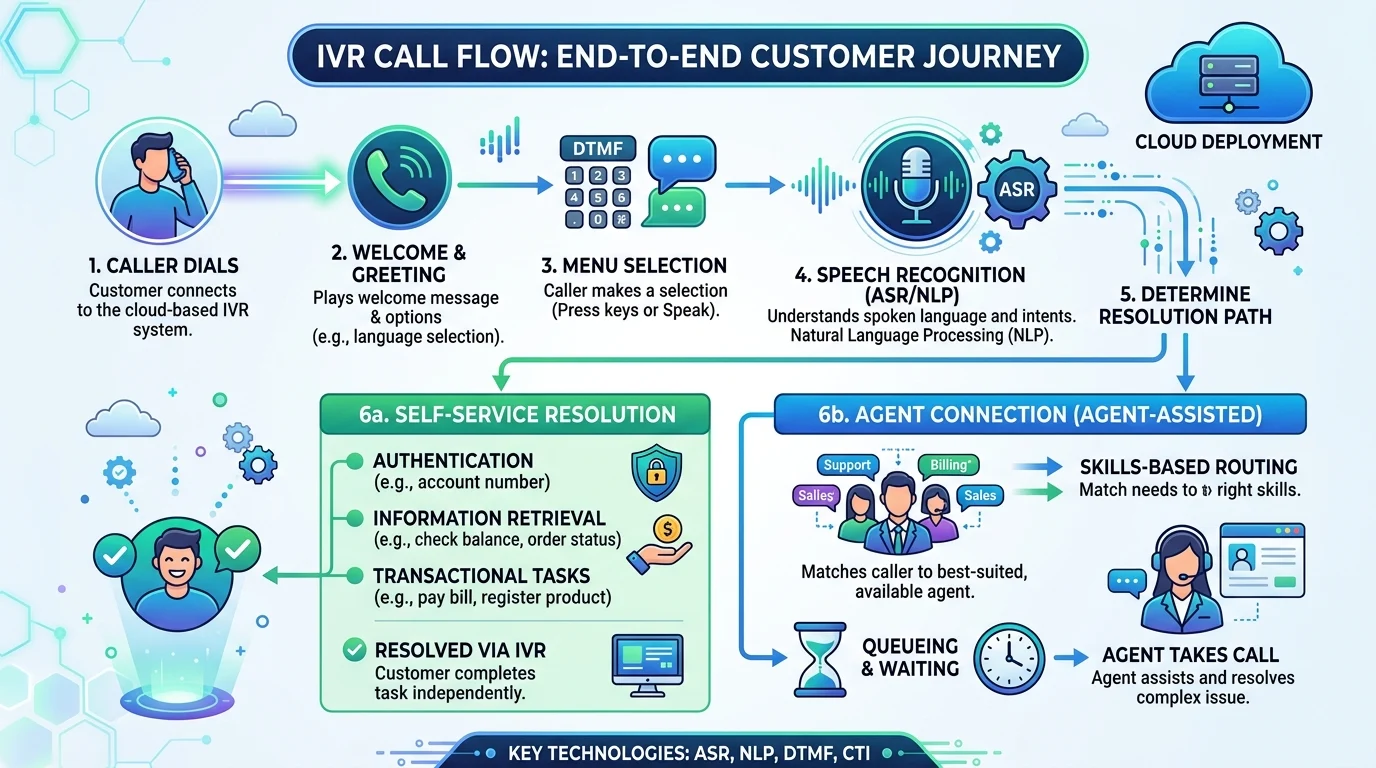
Quick Ans: Voice response software, commonly known as Interactive Voice Response (IVR), is an automated telephony system that interacts with callers through voice prompts and keypad or spoken input. It resolves simple requests directly or routes calls to the right agent. Key types include touch-tone IVR, directed dialogue IVR, and speech recognition IVR. Cloud IVR pricing ranges from ₹1–₹9 per minute for basic routing to ₹9–₹44 per minute for AI-powered conversational systems. Popular platforms include Genesys Cloud CX, NICE CXone, Five9, Talkdesk, RingCentral, and Ooma .
Every time you call a bank, hospital, or utility company and hear “Press 1 for billing, Press 2 for support,” you’re interacting with voice response software. It’s the invisible technology that handles millions of calls every day, routing them efficiently and resolving simple requests without a human agent.
Voice response software, formally known as Interactive Voice Response (IVR), is an automated system that interacts with callers through voice prompts and keypad or spoken input . It represents one of the most widely adopted customer service technologies, used across banking, healthcare, retail, telecommunications, and government sectors.
The technology has evolved dramatically. Early IVR systems relied on touch-tone menus. Today’s systems use speech recognition, natural language processing, and conversational AI to understand open-ended requests. Cloud deployment has replaced expensive on-premise hardware, making IVR accessible to businesses of all sizes. Whether you’re a small business setting up a virtual receptionist or an enterprise managing millions of calls, understanding voice response software helps you choose the right solution.
What Is Voice Response Software?
1. An Automated Telephony System
Voice response software automates interactions with callers through voice prompts and input mechanisms .
2. Known as Interactive Voice Response (IVR)
IVR is the industry-standard term for this technology .
3. Handles Calls Without Human Agents
The system resolves simple requests directly, reducing the burden on live agents .
4. Routes Calls to the Right Agent
When self-service isn’t enough, IVR routes callers to the appropriate department or skilled agent .
5. Uses DTMF and Speech Input
Callers interact using touch-tone keypad inputs or spoken commands .
6. A Self-Service Application
IVR is classified as a self-help application where voice clients interact via a voice channel .
7. Available in Cloud and On-Premise Deployments
Cloud IVR uses elastic infrastructure, while on-premise systems require significant upfront hardware investment .
8. Scales from Small Business to Enterprise
Solutions exist for every size, from virtual receptionists to large contact centers .
9. Integrates with CRM and Backend Systems
Modern IVR connects with customer databases for personalized experiences .
10. Evolved into Smart IVR
Modern systems integrate generative AI, NLP, and machine learning for natural conversations .
11. Market Segmentation by Technology
The market divides into speech-based and touch-tone-based systems .
12. Used Across Industries
Banking, healthcare, retail, telecommunications, and government all rely on IVR .
How Voice Response Software Works
1. Caller Dials the Number
The process begins when a caller reaches the organization’s phone number .
2. System Answers and Plays Greeting
An automated greeting welcomes the caller and presents options .
3. Caller Selects an Option
The caller responds using keypad input (DTMF tones) or spoken words .
4. Speech Recognition Processes Voice Input
Advanced systems convert spoken language into actionable data using ASR technology .
5. Natural Language Processing Understands Intent
NLP interprets the meaning behind the caller’s words, not just the literal words .
6. System Resolves or Routes the Call
Simple requests are resolved automatically. Complex ones route to the right agent .
7. Skills-Based Routing Matches Callers to Agents
The system captures signals like language or reason for calling, then matches to agent skill profiles .
8. Call Data Transfers to Agent Desktop
When a call reaches an agent, relevant data appears on their screen automatically .
9. VoiceXML Powers Many IVR Applications
VoiceXML is a markup language for building voice applications, analogous to HTML for web browsers .
10. Media Conversion Handles Text-to-Speech
TTS servers convert text prompts into audio for callers to hear .
11. Echo Cancellation Prevents Feedback
DSP resources compute real-time echo cancellation to prevent audio feedback .
12. End-Pointing Determines When Speech Ends
The system detects when the caller has finished speaking .
13. Barge-In Allows Interruption
Callers can interrupt prompts by speaking, and the system immediately stops playing .
14. Call Flow Varies by Time and Day
Systems can change behavior based on business hours, holidays, or special conditions .
15. Callback Options Reduce Wait Times
Callers can request a callback instead of waiting on hold .
Types of Voice Response Software
1. Touch-Tone Replacement IVR
The most basic type, requiring callers to press keys to select options from a menu .
2. Directed Dialogue IVR
This type asks specific questions and the caller responds with voice, such as “Opening hours” or “Address” .
3. Speech Recognition IVR
The most advanced traditional type, using voice recognition so callers speak naturally without pressing keys .
4. Smart IVR (Conversational IVR)
An advanced version integrating generative AI, NLP, and machine learning for natural, open-ended conversations .
5. Visual IVR
Replaces or supplements voice prompts with a tappable menu on the caller’s smartphone screen .
6. Cloud IVR
Runs on shared, elastic infrastructure with usage-based pricing and no hardware investment .
7. On-Premise IVR
Requires significant upfront hardware investment and ongoing maintenance .
8. Multi-Level IVR
Supports nested menus for complex routing scenarios .
9. Skills-Based IVR
Routes calls based on agent skills rather than flat queue position .
10. Callback IVR
Offers callers the option to receive a callback instead of waiting .
11. Texting-Enabled IVR
Converts voice calls to texting sessions for certain interactions .
12. AI-Powered IVR
Uses artificial intelligence for intent detection, continuous improvement, and natural conversations .
Leading Voice Response Software Solutions
1. Genesys Cloud CX
One of the most established names in contact center software, offering keypad and speech-based IVR with a drag-and-drop builder .
2. NICE CXone
Features AI-powered IVR with comprehensive contact center capabilities .
3. Five9
Offers flexible IVR that scales with mid-market and enterprise businesses, including speech recognition and AI-driven routing .
4. Talkdesk
Focuses on making IVR natural and easy to set up with conversational IVR and low-code tools .
5. RingCentral
The best overall IVR system, including multi-level IVR, call queues, call recording, AI features, and a large ecosystem of integrations .
6. Ooma
Best for small businesses wanting professional call menus, routing, and greetings without IT support .
7. KrispCall
A budget-focused option for small teams needing IVR and cloud phone features at a low starting price .
8. GoTo Connect
Best for integrations, combining business phone features with collaboration tools and CRM connections .
9. VoiceFleet
A 24/7 AI voice receptionist for small businesses, answering calls in 30+ languages with calendar integrations .
10. RingOperator
An AI phone agent for small service businesses, answering, booking, and qualifying calls around the clock .
Key Features to Look For
1. Multi-Level IVR Menus
Supports nested menus for complex call routing scenarios .
2. Speech Recognition
Understands spoken input, not just keypad presses .
3. Natural Language Processing
Interprets the meaning behind caller words for more natural interactions .
4. Skills-Based Routing
Routes calls to agents based on language, product expertise, or seniority .
5. Call Recording
Records calls for quality assurance and training .
6. Real-Time Analytics
Provides dashboards and reports on call volume, wait times, and resolution rates .
7. CRM Integrations
Connects with customer relationship management systems for personalized service .
8. Callback Options
Allows callers to request a callback instead of waiting on hold .
9. Visual IVR
Delivers tappable menus to smartphone screens for faster navigation .
10. Multilingual Support
Handles calls in multiple languages .
11. After-Hours Coverage
Provides automated service outside business hours .
12. Text-to-Speech
Converts written text into spoken prompts dynamically .
13. Barge-In Capability
Allows callers to interrupt prompts by speaking .
14. Call Summaries
AI-generated summaries of call content for efficient follow-up .
15. Appointment Booking
Integrates with calendars to book appointments directly during calls .
Pricing and Deployment Options
1. Cloud IVR Basic Pricing
Ranges from ₹1–₹9 per minute for basic call routing .
2. Cloud IVR AI-Powered Pricing
Ranges from ₹9–₹44 per minute for AI-powered conversational IVR with speech recognition .
3. On-Premise Investment
Requires approximately ₹8.8 lakh–₹88 lakh+ upfront, plus ongoing maintenance .
4. Per-User Monthly Pricing
Solutions range from around $12/user/month (KrispCall) to $30/license/month (RingCentral) .
5. Ooma Pricing
Essentials tier, Pro at $24.95/user/month, Pro Plus at $29.95/user/month .
6. VoiceFleet Pricing
Subscription from €99 per month with a 7-day free trial .
7. RingOperator Pricing
Starter at $25 per month with 100 minutes included .
8. Usage-Based Overages
Some plans charge per-minute overages above plan allowances .
9. Cloud-First Posture Recommended
Enterprises should pursue cloud-first where feasible for agility and elastic scaling .
10. Hybrid Options for Regulated Workloads
Retain private cloud options for workloads requiring specific governance .
Benefits and Limitations
1. Reduced Agent Workload
IVR resolves a share of calls through self-service before reaching live agents .
2. Lower Per-Call Cost
Cloud IVR reduces per-call agent cost by handling routine requests automatically .
3. 24/7 Availability
IVR provides service outside business hours and on holidays .
4. Faster Resolution for Simple Requests
Callers can get answers without waiting for an agent .
5. Improved Customer Experience
Skills-based routing connects callers to the right agent faster .
6. Scalability
Cloud IVR adds concurrent call capacity on demand .
7. Consistency
Automated prompts ensure consistent messaging across all calls.
8. Data Collection
IVR captures caller information for analytics and personalization.
9. Limitations: Frustration with Menus
Poorly designed IVR menus frustrate callers seeking human assistance.
10. Limitations: Speech Recognition Errors
Accents, background noise, and complex requests can confuse ASR systems.
11. Limitations: Complex Requests
IVR struggles with nuanced or unusual requests that require human judgment.
12. Limitations: Setup Complexity
Designing effective call flows requires planning and testing.
Frequently Asked Questions
What is voice response software?
It’s an automated telephony system, commonly called IVR, that interacts with callers through voice prompts and keypad or spoken input .
What does IVR stand for?
Interactive Voice Response .
How does IVR work?
The system answers calls, plays prompts, accepts input via keypad or speech, resolves simple requests, and routes complex ones to agents .
What are the types of IVR?
Touch-tone replacement, directed dialogue, speech recognition, and Smart IVR (conversational AI) .
What is Smart IVR?
An advanced IVR integrating generative AI, NLP, and machine learning for natural, open-ended conversations .
What is Visual IVR?
It replaces or supplements voice prompts with a tappable menu on the caller’s smartphone screen .
How much does cloud IVR cost?
Basic routing ranges from ₹1–₹9 per minute. AI-powered conversational IVR ranges from ₹9–₹44 per minute .
What is the difference between cloud and on-premise IVR?
Cloud IVR uses elastic shared infrastructure with usage-based pricing. On-premise requires significant upfront hardware investment .
What are the top IVR solutions?
Genesys Cloud CX, NICE CXone, Five9, Talkdesk, RingCentral, Ooma, KrispCall, and GoTo Connect .
What is skills-based routing?
It routes calls to the agent best equipped to handle them based on language, product expertise, or seniority .
Can IVR handle multiple languages?
Yes. Many modern systems support multilingual interactions .
What is a callback option in IVR?
It allows callers to request a callback instead of waiting on hold .
What is VoiceXML?
A markup language for building voice applications, analogous to HTML for web browsers .
What is barge-in in IVR?
It allows callers to interrupt prompts by speaking, immediately stopping the prompt playback .
What is the IVR market size?
The market is segmented by services, technology, deployment mode, organization size, and industry verticals .
Conclusion
Voice response software has become essential infrastructure for modern customer service. From simple touch-tone menus to AI-powered conversational systems, IVR technology handles millions of calls daily, routing them efficiently and resolving simple requests without human intervention.
The shift to cloud deployment has democratized access, making advanced IVR capabilities available to small businesses that once couldn’t afford on-premise systems. AI-powered Smart IVR represents the next evolution, using natural language processing and machine learning to understand open-ended requests and provide more human-like interactions.
For organizations evaluating IVR solutions, the key is matching capabilities to use-case priorities. Small businesses may need only basic routing and a virtual receptionist. Large contact centers require skills-based routing, CRM integration, and advanced analytics. Cloud-first deployment offers agility and elastic scaling, while hybrid options serve regulated workloads. When implemented thoughtfully, voice response software reduces costs, improves customer experience, and frees human agents to focus on complex, high-value interactions.
Discover More:
- Galvanic Skin Response Sensor: Complete Guide for 2026
- Exposure and Response Prevention Training: Complete Guide for 2026

2 thoughts on “Voice Response Software: Complete Guide for 2026”