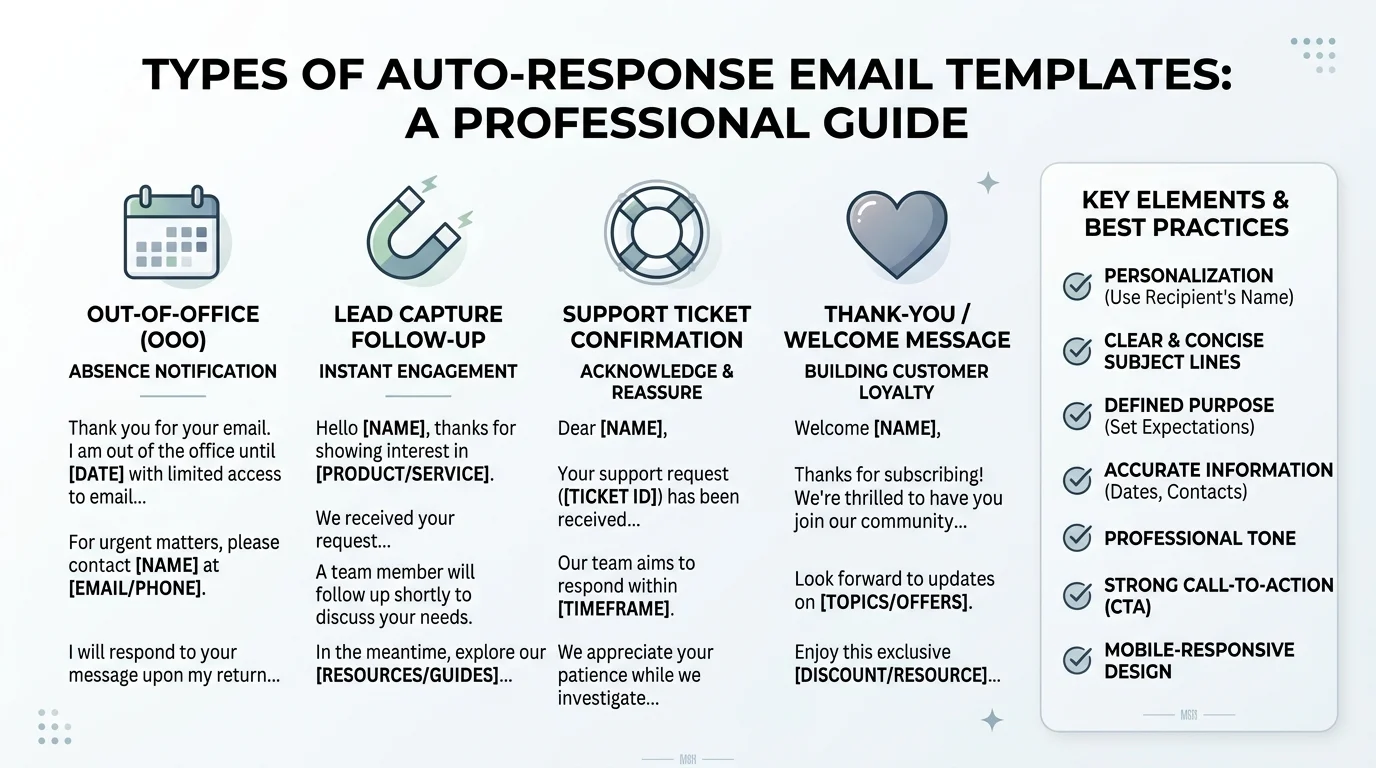
Quick Ans: An auto response email template is a pre-written message sent automatically when someone emails you. Common types include out-of-office replies, thank-you acknowledgments, support ticket confirmations, and lead capture responses. Effective templates include a clear subject line, personalized greeting, reason for the auto-reply, expected response time, and alternative contact options. The best templates are short, helpful, and set accurate expectations. Response rates improve when templates feel human rather than robotic.
You send an email and within seconds, a reply lands in your inbox. “Thanks for reaching out! We’ll get back to you within 24 hours.” That’s an auto response email template at work. Whether you’re running a business, managing a support team, or simply going on vacation, these templates save time and set expectations.
An auto response email template is a pre-written message that sends automatically when someone contacts you. They handle everything from out-of-office notifications to lead capture acknowledgments and support ticket confirmations. When done well, they make people feel heard and informed. When done poorly, they feel robotic and push people away.
The difference between a good auto response and a bad one often comes down to personalization, clarity, and timing. A generic “we’ll get back to you” can frustrate. A well-crafted template with specific timing and alternative contact options builds trust. Let’s explore how to create auto response templates that actually work for your business.
What Is an Auto Response Email Template?
1. A Pre-Written Automated Message
An auto response email template is a pre-written message that sends automatically when someone emails you .
2. Triggered by Specific Events
Auto responses can trigger on new emails, form submissions, support tickets, or specific keywords .
3. Used for Out-of-Office Notifications
The most common type, telling senders you’re unavailable and when you’ll return .
4. Used for Lead Capture Acknowledgments
Confirming receipt of inquiry and setting expectations for follow-up .
5. Used for Support Ticket Confirmations
Letting customers know their request was received and providing a ticket number .
6. Used for Thank-You Messages
Acknowledging orders, donations, or subscriptions .
7. Used for FAQ Responses
Providing immediate answers to common questions .
8. Different from Email Sequences
Auto responses send once per trigger; sequences send multiple scheduled emails .
9. Different from Drip Campaigns
Drip campaigns are marketing-focused; auto responses are transactional or informational .
10. Measured by Response Metrics
Track open rates, reply rates, and customer satisfaction to measure effectiveness .
11. Improves Response Time Perception
Even when you can’t respond immediately, auto responses show you’re paying attention .
12. Reduces Repetitive Work
Teams save hours by automating routine acknowledgments .
13. Sets Professional Tone
A well-crafted auto response reflects positively on your brand .
14. Builds Trust Through Transparency
Clear expectations reduce frustration and build confidence .
15. Should Always Offer an Alternative
Give senders another way to get help if the auto response doesn’t resolve their need .
Types of Auto Response Email Templates
1. Out-of-Office Template
Used when you’re on vacation, leave, or unavailable for an extended period .
2. Lead Capture Acknowledgment Template
Confirms receipt of a sales inquiry and sets expectations for follow-up .
3. Support Ticket Confirmation Template
Lets customers know their support request was received and provides a ticket number .
4. Thank-You for Purchase Template
Acknowledges an order and provides next steps like shipping information .
5. Thank-You for Donation Template
Acknowledges a donation and expresses gratitude on behalf of the organization .
6. Thank-You for Subscription Template
Confirms newsletter or service subscription and provides next steps .
7. FAQ Auto Response Template
Provides immediate answers to common questions to reduce support volume .
8. Meeting Request Acknowledgment Template
Confirms receipt of a meeting request and outlines next steps for scheduling .
9. Application Received Template
Confirms receipt of a job or program application and sets expectations for review .
10. Password Reset Confirmation Template
Confirms a password reset request and provides security instructions .
11. Order Status Update Template
Provides automated updates on order processing and shipping .
12. Appointment Reminder Template
Reminds recipients of upcoming appointments and provides rescheduling options .
13. Feedback Request Template
Asks for feedback after a purchase, service, or interaction .
14. Holiday Closure Template
Notifies senders of holiday hours and alternative contact options .
15. Emergency Auto Response Template
Used during crises or system outages to provide status updates and alternatives .
Key Elements of an Effective Auto Response Template
1. Clear and Specific Subject Line
The subject line should tell recipients exactly what the email is about .
2. Personalized Greeting
Use the recipient’s name when possible to avoid sounding robotic .
3. Reason for the Auto-Response
Explain why they’re receiving an automated message .
4. Expected Response Time
Tell recipients when they can expect a human response .
5. Alternative Contact Options
Provide phone, chat, or FAQ links for urgent matters .
6. Ticket or Reference Number
Include a unique identifier for support inquiries .
7. Next Steps
Tell recipients what will happen next and what they need to do .
8. Professional Signature
Include your name, title, company, and contact information .
9. Brand-Consistent Tone
Match the tone of your brand, whether formal, friendly, or casual .
10. Mobile-Friendly Formatting
Ensure the template reads well on phones and tablets .
11. Clear Call to Action
Tell recipients what action you want them to take, if any .
12. Minimal Jargon
Use plain language that anyone can understand .
13. Legal or Compliance Language
Include required disclaimers or unsubscribe links when necessary .
14. Personalization Tokens
Use merge fields for name, company, or other details to add a personal touch .
15. Testing Before Deployment
Always test templates with real email clients before going live .
Out-of-Office Auto Response Templates
1. Standard Vacation Template
Subject: Out of Office: [Your Name] Returns [Date]. Body: Thanks for your email. I’m currently out of the office and will return on [date]. For urgent matters, please contact [name] at [email]. I’ll respond to your message as soon as possible upon my return .
2. Short Vacation Template
Subject: Away from Email. Body: I’m away from email until [date]. For urgent matters, contact [name] at [email]. Otherwise, I’ll reply when I’m back. Thanks for your patience .
3. Conference or Travel Template
Subject: At [Conference Name]. Body: I’m attending [conference] from [dates] and have limited email access. I’ll respond as soon as possible. For urgent matters, contact [name] at [email] .
4. Parental Leave Template
Subject: On Parental Leave. Body: I’m on parental leave until [date]. For urgent matters, please contact [name] at [email]. I’ll respond to non-urgent messages upon my return .
5. Medical Leave Template
Subject: Out of Office. Body: I’m currently out of the office on medical leave. For immediate assistance, please contact [name] at [email]. Thank you for your understanding .
6. Sabbatical Template
Subject: On Sabbatical Until [Date]. Body: I’m on sabbatical until [date]. For urgent matters, please contact [name] at [email]. I look forward to connecting upon my return .
7. Holiday Closure Template
Subject: Holiday Closure. Body: Our office is closed for the holidays from [date] to [date]. We’ll respond to your message when we return on [date]. For urgent matters, please call [phone] .
8. Emergency Closure Template
Subject: Emergency Closure. Body: Due to an emergency, our office is closed. We’ll respond as soon as possible. For urgent matters, please call [phone] or email [alternative email] .
9. Part-Time Schedule Template
Subject: Part-Time Schedule. Body: I work part-time and may not respond immediately. I typically respond within [timeframe]. For urgent matters, contact [name] at [email] .
Business and Sales Auto Response Templates
1. Lead Capture Acknowledgment
Subject: Thanks for reaching out! Body: Hi [Name], thanks for contacting [Company]. We’ve received your inquiry and will respond within [timeframe]. In the meantime, check out our [resource link] .
2. Demo Request Acknowledgment
Subject: We received your demo request. Body: Hi [Name], thanks for requesting a demo. Our team will contact you within [timeframe] to schedule. Questions? Call [phone] .
3. Quote Request Acknowledgment
Subject: Your quote request is received. Body: Hi [Name], thanks for requesting a quote. We’ll send your personalized quote within [timeframe]. For urgent matters, call [phone] .
4. Contact Form Acknowledgment
Subject: We got your message. Body: Hi [Name], thanks for contacting us. We’ll respond within [timeframe]. For immediate help, call [phone] or chat with us at [link] .
5. Partnership Inquiry Acknowledgment
Subject: Partnership Inquiry Received. Body: Hi [Name], thanks for your partnership inquiry. Our team will review and respond within [timeframe] .
6. Vendor Inquiry Acknowledgment
Subject: Vendor Inquiry Received. Body: Hi [Name], thanks for your vendor inquiry. We’ll review your information and respond within [timeframe] .
7. Press Inquiry Acknowledgment
Subject: Press Inquiry Received. Body: Hi [Name], thanks for your press inquiry. Our media team will respond within [timeframe]. For urgent matters, call [phone] .
8. Billing Inquiry Acknowledgment
Subject: Billing Inquiry Received. Body: Hi [Name], thanks for contacting our billing team. We’ll review your inquiry and respond within [timeframe] .
9. Technical Support Acknowledgment
Subject: Support Ticket Received. Body: Hi [Name], your support ticket #[number] has been received. Our team will respond within [timeframe]. Track your ticket at [link] .
10. Feature Request Acknowledgment
Subject: Feature Request Received. Body: Hi [Name], thanks for your feature request. Our product team reviews all requests and will follow up if we need more details .
Support and Customer Service Auto Response Templates
1. General Support Acknowledgment
Subject: We received your support request. Body: Hi [Name], thanks for contacting support. Ticket #[number] has been created. We’ll respond within [timeframe] .
2. Urgent Support Acknowledgment
Subject: Urgent Support Request Received. Body: Hi [Name], we’ve received your urgent request. Our team is reviewing and will respond within [timeframe]. For immediate help, call [phone] .
3. After-Hours Support Acknowledgment
Subject: After-Hours Support Request. Body: Hi [Name], thanks for contacting us. Our support team is currently offline. We’ll respond when we reopen at [time]. For urgent matters, call [phone] .
4. Weekend Support Acknowledgment
Subject: Weekend Support Request. Body: Hi [Name], thanks for your message. Our team is offline for the weekend and will respond on [day]. For urgent matters, call [phone] .
5. Holiday Support Acknowledgment
Subject: Holiday Support Request. Body: Hi [Name], thanks for contacting us during the holidays. We’ll respond when we return on [date]. For urgent matters, call [phone] .
6. Password Reset Support Acknowledgment
Subject: Password Reset Request Received. Body: Hi [Name], we’ve received your password reset request. Follow the instructions sent to your email to reset your password. Need help? Contact [email] .
7. Account Issue Acknowledgment
Subject: Account Issue Received. Body: Hi [Name], thanks for reporting your account issue. Our team will investigate and respond within [timeframe] .
8. Order Issue Acknowledgment
Subject: Order Issue Received. Body: Hi [Name], thanks for contacting us about your order. We’ll investigate and respond within [timeframe]. For urgent matters, call [phone] .
9. Return Request Acknowledgment
Subject: Return Request Received. Body: Hi [Name], we’ve received your return request. Instructions will follow within [timeframe]. Questions? Contact [email] .
10. Warranty Claim Acknowledgment
Subject: Warranty Claim Received. Body: Hi [Name], thanks for submitting your warranty claim. Our team will review and respond within [timeframe] .
Best Practices for Auto Response Email Templates
1. Keep It Short and Scannable
Recipients should understand the message in seconds .
2. Personalize When Possible
Use merge fields for names, companies, or other details .
3. Set Accurate Expectations
Don’t promise response times you can’t meet .
4. Always Offer an Alternative
Provide a phone number, chat link, or FAQ for urgent matters .
5. Use a Clear Subject Line
Tell recipients exactly what the email is about .
6. Match Your Brand Voice
Formal, friendly, or casual, stay consistent with your brand .
7. Include a Ticket Number
For support inquiries, provide a unique identifier for tracking .
8. Test on Multiple Devices
Ensure the template reads well on phones, tablets, and desktops .
9. Avoid Over-Automation
Don’t send multiple auto responses to the same person .
10. Update Regularly
Review and update templates as processes and policies change .
11. Comply with Regulations
Include required disclaimers or unsubscribe links when necessary .
12. Track Performance
Monitor open rates, reply rates, and customer satisfaction .
13. Use Plain Language
Avoid jargon that might confuse recipients .
14. Include a Call to Action
Tell recipients what to do next, if anything .
15. Get Feedback
Ask colleagues or customers to review templates before deployment .
Frequently Asked Questions
What is an auto response email template?
It’s a pre-written message that sends automatically when someone emails you, used for out-of-office notifications, lead capture, support confirmations, and more .
What should an auto response email include?
A clear subject line, personalized greeting, reason for the auto-response, expected response time, alternative contact options, and a professional signature .
How long should an auto response email be?
Keep it short and scannable. Recipients should understand the message in seconds .
Should I use a different auto response for different situations?
Yes. Use different templates for vacation, support tickets, lead capture, and other scenarios .
Can I personalize auto response emails?
Yes. Use merge fields for names, companies, or other details to add a personal touch .
How often should I update my auto response templates?
Review and update them regularly, especially when processes or policies change .
What’s the difference between an auto response and an email sequence?
Auto responses send once per trigger. Sequences send multiple scheduled emails .
Do auto responses improve customer satisfaction?
Yes, when done well. They set expectations and show that you’re paying attention .
Should I include a phone number in my auto response?
Yes, provide alternative contact options for urgent matters .
Can auto responses hurt my business?
Poorly written auto responses can frustrate recipients. Keep them helpful, accurate, and human .
What is an out-of-office auto response?
It’s a template that tells senders you’re unavailable and when you’ll return, with alternative contacts for urgent matters .
What is a lead capture auto response?
It confirms receipt of a sales inquiry and sets expectations for follow-up .
What is a support ticket auto response?
It lets customers know their support request was received and provides a ticket number for tracking .
Conclusion
Auto response email templates are a simple but powerful tool for managing expectations and saving time. Whether you’re going on vacation, running a support team, or capturing leads, a well-crafted template makes people feel heard and informed. The best templates are short, personal, and always offer an alternative contact option for urgent matters.
Understanding the different types of auto responses helps you choose the right template for each situation. Out-of-office replies, lead capture acknowledgments, and support ticket confirmations each serve a unique purpose. When done well, they build trust and improve customer satisfaction.
Use this guide to create templates that reflect your brand voice and meet your recipients’ needs. Test them, update them regularly, and track their performance. A good auto response email template is more than an automated message. It’s a first impression that sets the tone for everything that follows.
Discover More:
- 150+ Baltimore Crisis Response Resources and Updates You Need to Know 2026
- RFP Response Automation Software: Complete Guide for 2026

3 thoughts on “Auto Response Email Templates: Complete Guide for 2026”