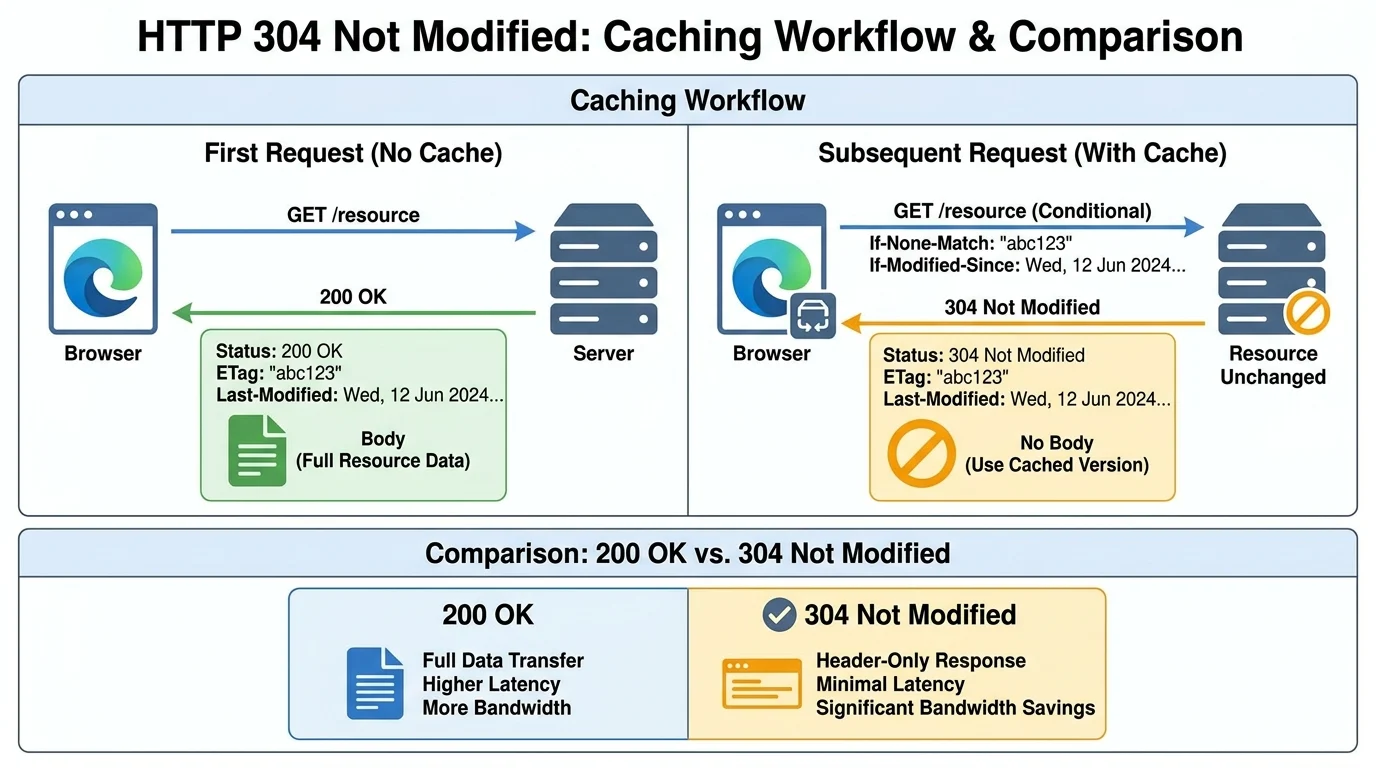
Quick Ans: The HTTP 304 Not Modified status code is a redirection response that tells your browser: “The resource hasn’t changed since your last request, so use your cached copy” . It saves bandwidth, speeds up repeat page loads, and reduces server load. When implemented correctly, a 304 response contains no message body, just headers like ETag and Cache-Control, confirming your cached version is still valid .
Every time you reload a webpage, your browser asks the server for images, CSS files, and scripts. Without caching, you’d download the same 500KB image every single time. That’s slow, wasteful, and expensive. Enter the 304 Not Modified response code.
This little status code is a behind-the-scenes superhero that makes the web feel snappy. It works silently, saving bandwidth and speeding up repeat visits . When Google recommends using 304 responses to conserve crawl budget , you know it’s a big deal. But what exactly triggers a 304? How does it differ from a 200 OK? And when does it become a problem?
The answer lies in a clever dance between browsers and servers, using conditional requests and caching headers. Let’s unpack everything you need to know about the 304 status code – from its technical mechanics to practical troubleshooting tips.
What Is the 304 Status Code?
The HTTP 304 Not Modified response code indicates that a resource has not changed since the client last requested it . Instead of sending the full resource again, the server tells the client: “Use what you already have in your cache.”
Think of it like this: you ask a friend for directions to a coffee shop. The first time, they give you detailed instructions (that’s the 200 OK with the full response). The next time you ask, they say, “Still the same!” (that’s the 304 Not Modified response). You already know the way, so you don’t need the full explanation again.
Key characteristics of a 304 response:
- Contains no message body
- Includes cache-related headers like ETag and Cache-Control
- Tells the client its cached copy is still valid
- Is classed as a redirection response (3xx), though no actual redirection occurs
The 304 response is not an error. It’s working exactly as designed to minimize data transfer and improve performance .
How Does a 304 Response Work? The Two-Step Dance
The 304 mechanism involves two crucial steps: the initial request and the subsequent conditional request.
Step 1: The Initial Request
The first time a browser requests a resource, the server responds with a 200 OK status, the full resource content, and two key headers :
- ETag (Entity Tag): A unique identifier for the resource’s version, often a hash of the file content.
- Last-Modified: A timestamp indicating when the resource was last changed.
Example:
GET /logo.png HTTP/1.1
Host: www.example.com
HTTP/1.1 200 OK
ETag: "abc123"
Last-Modified: Tue, 15 Sep 2025 11:00:00 GMT
Content-Type: image/png[Browser stores the resource plus these two “validators” in its cache.]
Step 2: The Conditional Request
When the browser needs the same resource again, it sends a “conditional request” using one of two headers :
- If-None-Match: “Please send this resource only if its current ETag is different from the one I have.”
- If-Modified-Since: “Please send this resource only if it’s been modified since this date.”
Step 3: The Server’s Decision
The server receives the conditional request and checks the resource:
- UNCHANGED: The server responds with 304 Not Modified and does not send the resource data.
- CHANGED: The server responds with 200 OK, the full resource data, and new ETag and Last-Modified headers for the browser to cache .
ETag vs. Last-Modified: Two Validation Methods
Two main headers control whether a server returns 304 or 200 .
The ETag Header
ETags are server-generated unique identifiers for each version of a resource. The server sends ETag: "abc123" with the initial response. On subsequent requests, the browser sends If-None-Match: "abc123". If the server’s current ETag matches, it responds 304. If not, it sends 200 with the new content and a new ETag.
The Last-Modified Header
The Last-Modified header tells the browser when a resource was last changed. On subsequent requests, the browser sends If-Modified-Since with that date. If the resource hasn’t been modified since then, the server responds 304.
Which One Should You Use?
ETag is generally more precise because it changes only when content actually changes. Last-Modified relies on timestamps, which can be inaccurate if files are touched without content changes. Many servers use both for maximum compatibility.
304 vs. 200: What’s the Difference?
| Feature | 200 OK | 304 Not Modified |
|---|---|---|
| Response Body | Full resource content | No body (empty) |
| Bandwidth Usage | Full transfer | Minimal (headers only) |
| Speed | Slower (downloads data) | Faster (uses cached data) |
| When Sent | Resource has changed or first request | Resource is unchanged |
| User Experience | Normal page load | Faster repeat page load |
From the user’s perspective, both result in the page loading. The difference is speed and bandwidth. A 304 response for a 500KB image saves 500KB of transfer .
Why Use 304 Responses? Key Benefits
1. Bandwidth Savings
Reduces unnecessary data transfer by avoiding full downloads of unchanged resources .
2. Faster Page Loads
Browsers load cached content instantly, improving user experience .
3. Lower Server Load
Servers don’t have to send full responses repeatedly, freeing resources for other requests .
4. Crawl Budget Optimization
Google recommends using 304 responses to conserve crawl budget, allowing crawlers to focus on new or changed content .
5. Scalability Support
Efficiently handles repeat requests, essential for large-scale websites and APIs .
Common Use Cases for 304 Responses
- Static Assets: CSS files, JavaScript, images, and fonts that don’t change often .
- REST APIs: Returning large JSON responses that are frequently requested .
- Mobile Apps: Apps syncing with servers to check for updates .
- CDN Optimization: Content Delivery Networks validating cached content globally .
- Search Engine Crawling: Googlebot checking if pages have changed .
Troubleshooting: When 304 Becomes a Problem
While 304 is not an error, it can cause issues when you’ve updated content but users keep seeing old versions . Here’s how to fix it.
1. Clear Your Browser Cache
The immediate fix for a user seeing stale content: clear the browser cache.
- Chrome: Settings → Privacy and Security → Clear Browsing Data → Cached Images and Files.
- Firefox: Options → Privacy and Security → Clear Data under Cookies and Site Data .
2. Disable Browser Caching for Debugging
During development, use browser DevTools to disable caching. In Chrome DevTools, open the Network tab and check “Disable Cache.” This forces every request to get a fresh 200 response, making it easy to verify content updates .
3. Update Cache-Control Headers Server-Side
Reduce the max-age value to force browsers to re-validate cached content more often. Example in nginx:
location ~* \.(css|js)$ {
    add_header Cache-Control "public, max-age=300";
}
Setting max-age to a shorter value means browsers check for updates more frequently .
4. Use no-cache for Critical Resources
The no-cache directive forces the browser to revalidate with the server every time, triggering a 304 if unchanged or a 200 if updated .
5. Check Conditional Headers
If Googlebot isn’t sending If-None-Match or If-Modified-Since headers consistently, you may still safely respond with 304 if you know the content hasn’t changed . However, for initial indexing, a 200 response is still recommended .
Frequently Asked Questions
Is 304 an error?
No, 304 is working as designed. It’s a caching response, not an error .
What’s the difference between 304 and 200?
A 200 sends the full resource. A 304 sends only headers confirming the cached version is current. Both result in the page loading, but 304 is faster and uses less bandwidth .
Why am I seeing 304 for API requests?
The browser is caching the API response. You can bypass this by disabling cache in DevTools or using tools like Postman or curl .
How do I force a fresh response?
Use Cache-Control: no-cache, reduce max-age, or clear your browser cache .
Can Googlebot cache 304 responses?
Yes. Google recommends using 304 to conserve crawl budget. If the content hasn’t changed, returning 304 tells Googlebot to reuse the cached version .
Should I return 304 for uncrawled pages?
For pages not yet indexed, a 200 response is better. Google may not index or refresh cache from a 304 alone if the page wasn’t previously indexed .
What headers should a 304 response include?
It must include the same headers as a 200 response, such as ETag, Cache-Control, Content-Location, Date, Expires, and Vary .
Conclusion
The 304 Not Modified status code is a cornerstone of web performance. It saves bandwidth, speeds up loading times, and reduces server load by telling clients to use cached resources when nothing has changed.
Implementing 304 correctly requires proper cache headers: ETag for precise versioning, Last-Modified for timestamp-based validation, and Cache-Control for defining freshness rules . When content changes, send a 200 with the full resource. When it hasn’t, send a 304 with no body.
Google’s recommendation to use 304 for crawl efficiency underscores its importance for SEO and server resource management . But remember: 304 is not an error . It’s your server saying, “Nothing new here, keep what you have.”
Now you know exactly what that 304 response means and how to handle it. The next time you see it in your browser’s network panel, you’ll recognize the caching superhero at work.
Discover More:
- 150+ Clear Explanations of Response and Explanatory Variables 2026
- National Guard Response Force: Your Complete Guide to Understanding This Critical Mission 2026

1 thought on “Response Code 304 Not Modified: A Complete Guide to This Web Caching Superhero 2026”