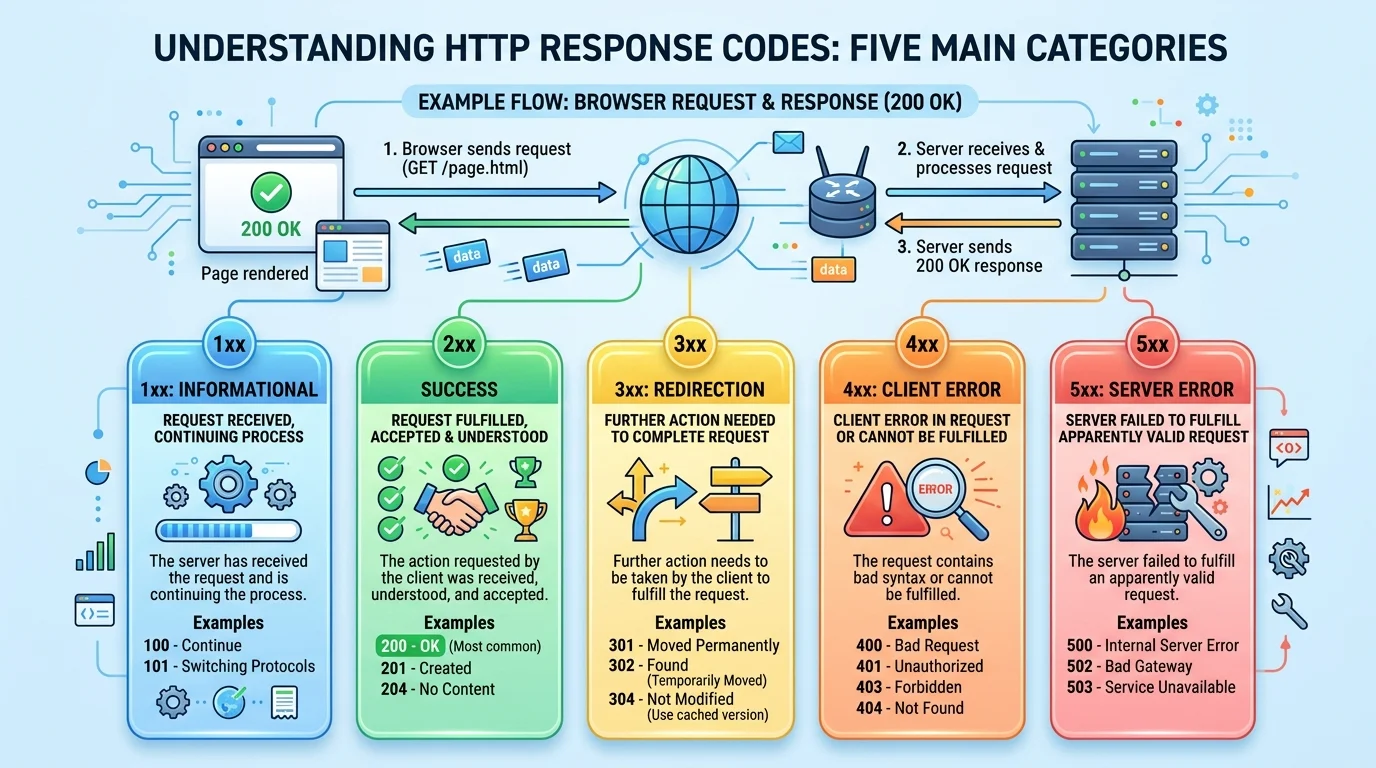
Quick Ans: Server response codes are three-digit numbers a web server sends back to your browser after every request. The first digit tells you the category: 1xx (informational), 2xx (success), 3xx (redirection), 4xx (client error), and 5xx (server error) . Common examples include 200 OK (success), 301 Moved Permanently (redirect), 404 Not Found (missing page), and 500 Internal Server Error (server problem). Understanding these codes helps you troubleshoot websites, improve SEO, and diagnose server issues quickly.
Every time you click a link, load a page, or submit a form, your browser and a web server exchange a silent conversation. The server’s reply comes as a three-digit number. That number is a server response code.
Server response codes are the language servers use to tell browsers what happened with a request. They are part of the HTTP protocol, the foundation of all web communication. A 200 means everything worked. A 404 means the page doesn’t exist. A 502 means something broke between servers. A 503 means the server is temporarily overwhelmed.
For website owners, developers, and SEO professionals, these codes are not just technical trivia. They affect user experience, search rankings, and revenue. A site returning 500 errors consistently will drop in Google rankings. A misconfigured 301 redirect can break links and lose traffic. Understanding response codes is essential for anyone who works with websites. Let’s break down every category and the most important codes you’ll encounter.
The Five Categories of Server Response Codes
1. 1xx: Informational Responses
These codes indicate a provisional response, meaning the server received the request and is continuing to process it .
2. 1xx Are Rarely Seen by Users
Most users never encounter 1xx codes because they are interim responses, not final ones .
3. 100 Continue Is the Most Common 1xx
It tells the client that the initial part of the request was received and the server wants the rest .
4. 101 Switching Protocols
Used when a client requests an upgrade, such as switching from HTTP to WebSocket .
5. 2xx: Successful Responses
These codes mean the request was successfully received, understood, and accepted .
6. 200 OK Is the Most Common Code
Every successful page load returns a 200 OK. The payload depends on the request method .
7. 201 Created
The request succeeded and a new resource was created, often used with POST requests .
8. 204 No Content
The request succeeded but there is no body to return, often used for DELETE operations .
9. 3xx: Redirection Responses
These codes tell the client that further action is needed to complete the request, usually involving a different URL .
10. 301 Moved Permanently
The resource has permanently moved to a new URL. Browsers and search engines update their records .
11. 302 Found
The resource temporarily resides at a different URL. The original URL should still be used .
12. 304 Not Modified
The cached version is still valid. The server sends no body, saving bandwidth .
13. 4xx: Client Error Responses
These codes indicate that the request contains bad syntax or cannot be fulfilled due to a client-side issue .
14. 5xx: Server Error Responses
These codes indicate the server failed to fulfill a valid request. The problem is on the server side .
Common 4xx Client Error Codes
1. 400 Bad Request
The server cannot process the request due to malformed syntax or invalid data.
2. 401 Unauthorized
The request requires authentication, but the client did not provide valid credentials .
3. 403 Forbidden
The server understood the request but refuses to authorize it. Access is denied .
4. 404 Not Found
The most famous error code. The requested resource does not exist on the server .
5. 404 Can Be Intentional
Some servers return 404 to hide the existence of protected resources .
6. 405 Method Not Allowed
The request method is known but not supported for the target resource.
7. 408 Request Timeout
The client started a request but did not complete it within the server’s keep-alive timeout .
8. 410 Gone
The resource existed but has been permanently removed.
9. 413 Payload Too Large
The request body exceeds the server’s limits .
10. 414 URI Too Long
The requested URL is longer than the server is willing to process .
11. 429 Too Many Requests
The client has sent too many requests in a given amount of time (rate limiting).
12. 4xx Codes Impact SEO
Persistent 404s and 410s tell search engines to remove pages from their index.
13. Fixing 4xx Errors Matters
Broken links frustrate users and waste crawl budget.
14. Monitor 4xx Trends
A spike in 404s often indicates a broken deployment or misconfigured redirect.
15. 4xx Is Not Always the Client’s Fault
Misconfigured servers can return 4xx codes incorrectly.
Common 5xx Server Error Codes
1. 500 Internal Server Error
A generic error indicating the server encountered an unexpected condition .
2. 500 Has Many Causes
Common causes include PHP memory limits, faulty plugins, corrupted .htaccess files, and file permission issues .
3. Troubleshooting 500 Errors
Check error logs, disable plugins one by one, verify file permissions (644 for files, 755 for folders) .
4. 501 Not Implemented
The server does not support the functionality required to fulfill the request.
5. 502 Bad Gateway
The server, acting as a gateway or proxy, received an invalid response from an upstream server .
6. 502 Is Usually a Network Issue
The problem is between servers, not with your computer .
7. 502 Often Fixes Itself
Refreshing the page or waiting a few minutes often resolves temporary 502 errors .
8. Common 502 Causes
Unresponsive servers, massive traffic spikes, DNS propagation during migrations, and firewall misconfigurations .
9. 503 Service Unavailable
The server is temporarily unable to handle the request, often due to overload or maintenance .
10. 503 Can Include Retry-After
The Retry-After header tells the client how long to wait before retrying .
11. 504 Gateway Timeout
The server, acting as a gateway or proxy, did not receive a timely response from an upstream server .
12. 504 vs 502
A 504 means no response was received in time. A 502 means an invalid response was received .
13. Troubleshooting 504 Errors
Check backend server response times, increase timeout settings, and verify network connectivity .
14. 505 HTTP Version Not Supported
The server does not support the HTTP protocol version used in the request .
15. 5xx Errors Hurt SEO
Persistent server errors cause search engines to drop pages and reduce crawl rates.
How Server Response Codes Work
1. Every Request Gets a Response
The server sends back a status line containing the HTTP version, status code, and reason phrase .
2. The Reason Phrase Is Informational
It gives a short textual description of the status code, but clients are not required to display it .
3. Status Codes Are Extensible
New codes can be defined, but applications must understand the class of any code they receive .
4. Unrecognized Codes Are Treated as x00
A client receiving an unrecognized 4xx code treats it like a 400. An unrecognized 5xx becomes a 500 .
5. 1xx Responses Are Interim
They are terminated by an empty line and may be ignored by clients that don’t expect them .
6. 1xx Must Not Be Sent to HTTP/1.0 Clients
The HTTP/1.0 specification did not define 1xx codes .
7. Proxies Must Forward 1xx Responses
Unless the proxy itself requested the generation of the response .
8. 304 Responses Have No Body
All 1xx, 204, and 304 responses must not include an entity body .
9. 200 Responses Include a Body
For GET requests, the body is a representation of the target resource .
10. HEAD Requests Return Headers Only
The metainformation should be identical to a GET response, but without the body .
11. Response Headers Provide Additional Information
Fields like Location, Retry-After, and Server give clients more context .
12. Location Header Used With 3xx
It tells the client where to find the resource at its new location .
13. Retry-After Used With 503 and 3xx
It indicates how long the client should wait before retrying .
14. Content-Length Header Specifies Body Size
It tells the client how many bytes to expect .
15. Status Codes Are Part of HTTP Semantics
They are defined in the HTTP specifications maintained by the IETF .
Troubleshooting Common Server Errors
1. Start With the Simplest Fix
Reload the page. Many errors are temporary and resolve on retry .
2. Clear Browser Cache
Stale cached data can sometimes cause error pages to persist .
3. Check Error Logs for 500 Errors
Error logs reveal the specific cause, whether PHP, permissions, or plugin issues .
4. Verify File Permissions
Files should be 644, folders 755, and CGI scripts 755 .
5. Disable Plugins One by One
For WordPress sites, plugins are a common cause of 500 errors .
6. Switch to a Default Theme
If plugins aren’t the issue, the theme may be causing problems .
7. Check .htaccess Syntax
A single typo in .htaccess can crash the entire site with a 500 error .
8. For 502 Errors, Check Server Status
The issue is usually at the hosting level, not with your computer .
9. Contact Your Host for 502 and 504
These errors often require server-side investigation and fixes .
10. Increase Timeout Settings for 504
If backend processes take longer than the timeout allows, increase the limit .
11. Check Backend Server Health
For 504 errors, verify the backend is running and responsive .
12. Verify Firewall Rules
Misconfigured firewalls can block legitimate traffic and cause 502 errors .
13. Check DNS Propagation
After migrations, DNS changes can cause temporary 502 errors .
14. Monitor Server Resources
Overloaded servers with high CPU or memory usage often return 5xx errors.
15. Use Monitoring Tools
Uptime monitors and log analyzers catch response code issues before users report them.
SEO Impact of Server Response Codes
1. 2xx Codes Are Good for SEO
200 OK tells search engines the page is healthy and indexable.
2. 301 Redirects Pass Link Equity
Permanent redirects tell search engines to update their index to the new URL.
3. 302 Redirects Are Temporary
They don’t pass full link equity and should be used sparingly for SEO purposes.
4. 404s Waste Crawl Budget
Too many 404s cause search engines to crawl your site less frequently.
5. 410 Tells Google to Remove Pages Faster
A 410 Gone is a stronger signal than 404 that a page is permanently removed.
6. 5xx Errors Cause Ranking Drops
Persistent server errors signal to Google that your site is unreliable.
7. Googlebot Retries 5xx Errors
Repeated 5xx responses eventually lead to reduced crawl rates and indexing issues.
8. 503 With Retry-After Helps
During planned maintenance, a 503 with Retry-After tells Google to come back later.
9. 429 Rate Limiting Can Hurt SEO
If Googlebot gets rate-limited, it may slow down crawling.
10. Monitor Response Codes Regularly
Regular audits catch issues before they impact rankings.
11. Fix Broken Links
Redirect or remove pages returning 404s to preserve user experience and SEO.
12. Use 301 for Permanent Moves
Always use 301 when permanently moving content to a new URL.
13. Avoid Redirect Chains
Multiple redirects slow page load and dilute link equity.
14. Check Mobile Response Codes
Mobile-specific errors can hurt mobile-first indexing.
15. Use Google Search Console
The Coverage report shows how Google sees your response codes.
Frequently Asked Questions
What is a server response code?
It’s a three-digit number a web server sends to a browser indicating the result of a request .
What do the different first digits mean?
1xx is informational, 2xx is success, 3xx is redirection, 4xx is client error, and 5xx is server error .
What is the most common response code?
200 OK is the most common, returned for every successful page load .
What does a 404 error mean?
The requested resource does not exist on the server. It’s the most famous error code .
What does a 500 error mean?
A generic server error indicating the server encountered an unexpected condition .
What is the difference between 502 and 504?
A 502 means the server received an invalid response from an upstream server. A 504 means no response was received in time .
What is a 301 redirect?
It tells browsers and search engines that a resource has permanently moved to a new URL .
What is a 304 response?
It tells the client to use its cached copy because the resource hasn’t changed .
What does 503 Service Unavailable mean?
The server is temporarily unable to handle the request, often due to overload or maintenance .
How do I fix a 500 Internal Server Error?
Check error logs, verify file permissions, disable plugins one by one, and check .htaccess syntax .
How do I fix a 502 Bad Gateway error?
Often it’s temporary, so refresh the page. If persistent, contact your hosting provider .
How do I fix a 504 Gateway Timeout error?
Check backend server response times, increase timeout settings, and verify network connectivity .
What is a 429 error?
It means the client has sent too many requests in a given time period (rate limiting).
Conclusion
Server response codes are the silent language of the web. Every request gets a three-digit reply that tells browsers, search engines, and developers exactly what happened. The first digit is the most important: 1xx for information, 2xx for success, 3xx for redirects, 4xx for client errors, and 5xx for server errors.
For website owners, understanding these codes is not optional. A misconfigured 301 can lose link equity. Persistent 500 errors can drop your site from Google. A 404 spike after a deployment means broken links and frustrated users. Knowing how to read and respond to these codes keeps your site healthy and your users happy.
Whether you’re troubleshooting a 502 error, setting up redirects, or monitoring your site’s health, this guide gives you the foundation. Bookmark it, share it with your team, and use it the next time a three-digit number appears in your browser. Your website will thank you.
Discover More:
- Clearblue vs First Response: Which Pregnancy Test Is Better in 2026?
- Response Generalization vs Stimulus Generalization: Complete Guide for 2026
